Workflow Idea: Generate SEO-Optimized WordPress Content with AI
This workflow is designed to automate the creation and publication of SEO-optimized content on WordPress sites. It integrates AI research, content generation, and automated publishing to enhance efficiency and effectiveness for content creators, marketers, and businesses.
Key Features
-
- Manual Trigger: Initiates the SEO-Optimized WordPress Content workflow based on specific inputs.
-
- Research Node: Utilizes Perplexity AI for comprehensive topic research.
-
- AI Model Node: Employs OpenAI GPT-4o for generating structured and compelling content.
-
- Write Article Node: Tailors content style and length according to SEO guidelines.
-
- Optimize SEO Node: Enhances content for better search engine rankings.
-
- Unsplash Image Node: Automatically fetches and uploads relevant images.
-
- Post Node: Publishes content to WordPress with all necessary metadata.
-
- Send Email Node: Notifies stakeholders upon completion.
Implementation Steps Of SEO-Optimized WordPress Content Workflow
1. Trigger Workflow
Start the SEO-Optimized WordPress Content workflow using a Manual Trigger or a Gravity Forms Trigger based on specific inputs like a blog topic or keywords. For detailed instructions, refer to the Manual Trigger Documentation.
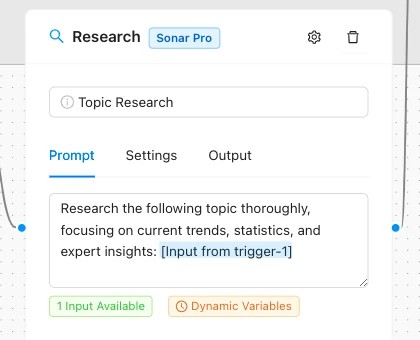
2. Research Content
Implement the Research Node to gather insights using Perplexity AI. This ensures your content is well-informed and rich. Learn more in the Research Node Documentation.
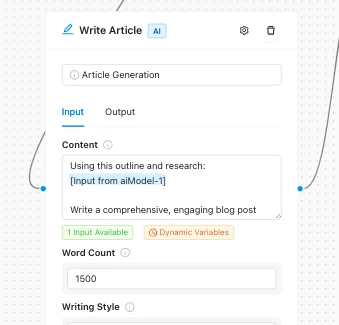
3. Content Generation
Use the AI Model Node with OpenAI GPT-4o to generate the main content, including titles, headings, and body text. Then, use the Write Article Node to tailor the content according to SEO guidelines, ensuring it is both structured and compelling. For more details, see the AI Model Node Documentation.
4. SEO Optimization
Pass the generated content through the Optimize SEO Node to enhance its SEO performance. This step fine-tunes elements like meta descriptions and keyword density. Refer to the Optimize SEO Node Documentation for more information.
5. Image Handling
Add the Unsplash Image Node to automatically fetch and upload relevant images to your blog post. For detailed guidance, check the Unsplash Image Node Documentation.
6. Publish Content
Use the Post Node to draft and publish the content to your WordPress site, complete with images and metadata. For more on this, see the Post Node Documentation.
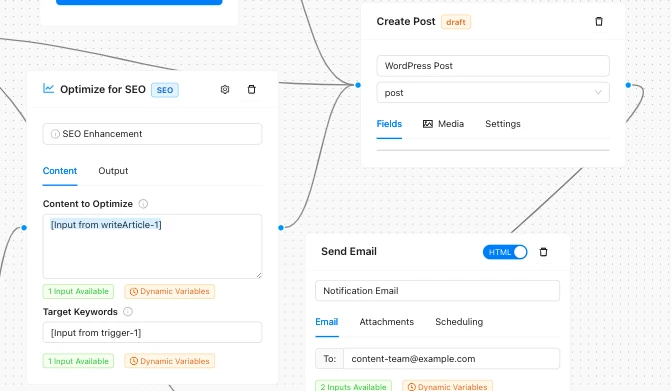
7. Notification Upon Completion
Implement the Send Email Node to notify relevant team members or stakeholders that the new post has been published. Alternatively, use a Webhook Output for integration with chat applications like Telegram. For more details, refer to the Send Email Node Documentation.
Conclusion
By following these steps and utilizing the AI Agent capabilities of the AI Workflow Automation plugin, you can efficiently automate the creation and publication of SEO-optimized content on your WordPress site. This not only saves time but also ensures that your content remains high-quality and relevant, leveraging the power of Agentic AI to streamline your workflow.