To bulk-generate WooCommerce product descriptions with AI, you run a workflow that reads each product’s attributes and writes unique copy for the whole catalogue at once. AI Workflow Automation, a free WordPress plugin, does this natively in WooCommerce: it pulls names, categories, and specs, generates on-brand descriptions with your own API key, and saves them as drafts you approve before publishing.
I develop AI Workflow Automation, and this walkthrough uses the real node names and field labels from the builder, including the parts that are more awkward than the marketing version. AI Workflow Automation is a free WordPress plugin with a visual drag-and-drop builder that runs AI workflows, agents, and chatbots inside your own site, using your own API keys, with no external subscription required.
Why bulk-generate WooCommerce product descriptions instead of writing them one by one?
Because catalogue copy is the highest-volume, lowest-variance writing job in e-commerce. WooCommerce has more than 7 million active installations on the WordPress.org plugin directory as of July 2026, and a large share of those stores are running supplier-supplied descriptions that appear verbatim on dozens of competing sites.
Three failure states are common, and all three are volume problems rather than writing problems:
- Empty descriptions. The product imported with a name, a price, and nothing else.
- Duplicate manufacturer copy. Identical text on every reseller’s page, so none of them has anything distinctive to rank with.
- Inconsistent voice. Years of part-time contributors, each with a different idea of tone and structure.
A workflow fixes all three in one pass, because the prompt, the structure, and the field mapping are defined once and applied to every item.
What does the AI need so the copy is not generic?
Generic output is almost always an input problem. A model given only a product name will write about the category, not the product, because the category is all it can infer. Feed it the attributes and the copy changes character immediately.
| Input you supply | What it does in the description |
|---|---|
| Product name and SKU | Anchors the copy to the exact item, not the range |
| Category and tags | Sets the vocabulary and buyer expectations |
| Attributes (size, material, capacity) | Supplies the concrete specifics that make copy non-interchangeable |
| Price band | Calibrates the register, since budget and premium copy differ |
| Brand context paragraph | Enforces one voice across the whole catalogue |
| Two approved examples | Shows structure and length far better than instructions do |
The brand context paragraph is the piece people skip and then complain about. Write 80 to 120 words describing who buys from you, what you never claim, and which words are banned. Paste it into the prompt on every run. It is the difference between copy that sounds like your store and copy that sounds like a marketplace listing.
How do you build the bulk generation workflow in WordPress?
Here is the actual node chain. The Loop / While node does the batching, the AI Prompt node does the writing, and a write-back node commits the result.
- Start with a Manual trigger. Bulk jobs should be things you deliberately launch and watch, not things that fire on a timer.
- Fetch the product list. Add an API Call node, set Method to GET, and point the URL at your own store’s WooCommerce REST endpoint, for example
/wp-json/wc/v3/products?per_page=50&status=publish. Set Auth to basic and supply a WooCommerce consumer key and secret. Alternatively, export a CSV and run it through the Document Parser node. - Add the Loop / While node. Leave Loop type on “For each” and point Content at the product array from the previous node. Inside the body branch you can read
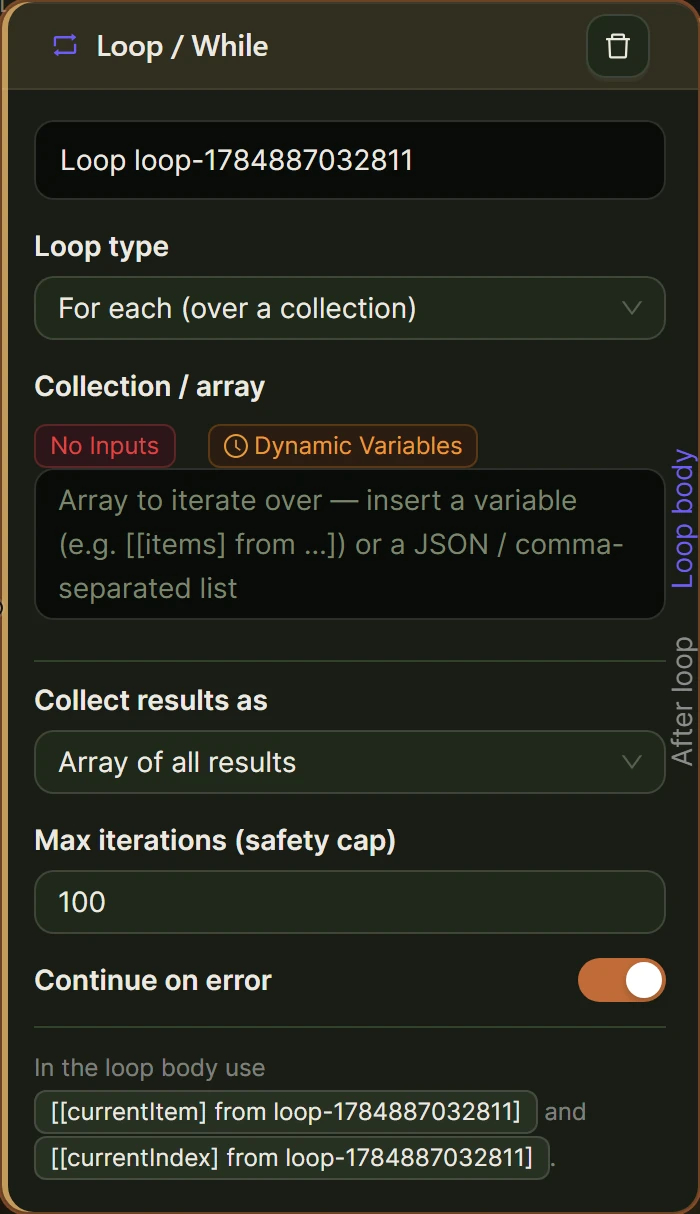
[[currentItem] from loop-1],[[currentIndex] from loop-1],[[totalCount] from loop-1], plus[[isFirst]]and[[isLast]]. - Connect the AI Prompt node to the body handle. Turn on the Structured output toggle and define three fields:
description,short_description, andmeta_description. Put your brand context and the two example descriptions in the prompt, then interpolate the current product’s attributes. - Write the result back. Add a second API Call node with Method set to PUT against
/wp-json/wc/v3/products/{id}, mapping[[description] from ai-1]and[[short_description] from ai-1]into the JSON body. - Set the Loop node’s Output mode. Choose accumulate to collect every result for a summary, or individual if each iteration is fully self-contained.
- Wire the “after” handle to a review step. Send yourself the accumulated output by email, or pass it into a Human Input node so the batch gets a sign-off before the next one runs.
One limitation to be straight about. The Create Post/Product node creates posts, custom post types, and WooCommerce products, with field mappings that include Regular Price, Sale Price, SKU, and Stock Quantity alongside custom and ACF fields. It is the right node when you are importing a new range. It is not an update node, so rewriting descriptions on products that already exist goes through the WooCommerce REST API via the API Call node as described above.
A note on node choice: the Write Article node targets a word count between 100 and 10,000 and is built for long-form editorial, so it is the wrong tool here. Product copy needs several short, separately addressable fields, which is what the AI Prompt node’s structured output gives you.
If you want to see the AI half of this working before you wire anything, the AI Product Copy Generator demo runs a product image through a vision model and returns store-ready copy in your browser.
How do you run it across a whole catalogue safely?
The Loop / While node has a Max iterations field that defaults to 100. Treat that default as a feature, not a constraint to raise. Running 100 products, reviewing them, and then running the next 100 is how you avoid discovering a prompt flaw after 4,000 rewrites.
The node also has a “Continue on error” toggle that is enabled by default, so a single failed product does not abort the batch. That is the behaviour you want for bulk work, but it means you must actually read the accumulated output to notice which items failed.
My working sequence on a real store:
- Run 5 products first. Set Max iterations to 5 and read every word of the output.
- Fix the prompt, then run 50. Most prompt problems are visible at 5 items and all of them are visible at 50.
- Write to a staging field before production. On the first full batch, PUT the copy into a custom meta field rather than
description, and diff it against the live text. - Batch by category. One category per run keeps the brand context relevant and makes the review pass coherent.
- Back up first. A database backup before a bulk write is not optional. The API Call node will happily overwrite 500 descriptions.
Run bulk jobs from the builder in local mode, where you can watch the live execution, rather than on a schedule.
How do you keep every description unique and SEO-friendly?
Uniqueness comes from the inputs, not from asking the model to “be unique”. If two products differ only by colour and your prompt only passes the name, the two descriptions will be near-identical no matter what the instructions say. Pass the attributes that actually differ.
Four rules that hold up:
- Include at least three product-specific facts per description. Dimensions, material, compatibility, capacity, care instructions. Facts are what makes the text unliftable from a competitor.
- Vary the structure deliberately. Ask for a schema field per section rather than a single blob, and let some categories use a benefits list while others use prose.
- Generate the short description separately. WooCommerce shows it above the fold. It should not be the first two sentences of the long description.
- Feed the copy into your structured data. Google’s Product structured data documentation distinguishes merchant listings, for pages where the product can be bought, from product snippets, and recommends supplying as much rich product information as you have. WooCommerce emits product markup already, so a better description improves what is already being read.
Skip the keyword-stuffing instinct. Copy written for a buyer 30 seconds from a purchase decision outperforms copy written for a crawler.
How do you review and spot-check the output?
Spot-checking is the step that separates a catalogue refresh from a catalogue incident. Do it on every batch, not just the first.
- Check 10% of each batch, minimum 5 items. Pick them at random, not from the top of the list.
- Verify every factual claim against the product attributes. Models invent compatibility, certifications, and materials when the input is thin. This is the single most expensive error type in e-commerce copy.
- Search your own site for a distinctive phrase from one description. If it returns three products, your inputs are too similar.
- Read two descriptions from different categories back to back. They should sound like the same brand and describe different things.
- Check length against your theme. Copy that overflows a fixed-height product card is a layout bug you shipped 400 times.
For a formal sign-off step, put a Human Input node on the Loop node’s “after” handle, set to Approval Required and assigned to a role. Approve and Revert become two branches, so a rejected batch can route to a notification instead of continuing.
What does it cost per product with your own API key?
Because AI Workflow Automation uses your own API key, you pay the provider’s list rate with no per-product platform markup. A typical description run sends roughly 500 input tokens (attributes, brand context, examples) and returns roughly 250 output tokens.
At OpenAI’s July 2026 list price for GPT-5 mini of $0.125 per million input tokens and $1.00 per million output tokens, that works out to about $0.0003 per product, or roughly 31 cents for 1,000 products. Even on a frontier model an order of magnitude more expensive, a 1,000-product catalogue refresh stays in single-digit dollars. Prices change, so check your provider’s current rate before budgeting.
The plugin itself adds nothing to that in local mode. Cloud execution and the Connect an App node use platform credits, but the workflow above runs entirely locally.
Frequently asked questions
Can AI write WooCommerce product descriptions in bulk?
Yes. In AI Workflow Automation you fetch the product list with an API Call node, iterate it with the Loop / While node, generate copy with an AI Prompt node using structured output, and write back through the WooCommerce REST API. Max iterations defaults to 100, so a large catalogue is processed as reviewable batches rather than one uncontrolled run.
Will AI-generated product descriptions hurt my store’s SEO?
Generic or duplicate copy hurts SEO whether a human or a model wrote it. AI-generated descriptions built from real product attributes are usually a large improvement over duplicated manufacturer text, which appears identically on every reseller’s site. Include product-specific facts, generate a distinct short description, and review each batch before publishing.
Does the plugin update existing WooCommerce products or only create new ones?
The Create Post/Product node creates posts, custom post types, and WooCommerce products, and it maps WooCommerce fields such as Regular Price, Sale Price, SKU, and Stock Quantity. It does not update existing items. To rewrite descriptions on products already in your catalogue, use the API Call node with Method set to PUT against the WooCommerce REST API.
How long does it take to rewrite a 1,000-product catalogue?
Generation is fast, typically a few seconds per product, so the model is rarely the bottleneck. Realistically, plan for batches of 100 with a review pass between them. Most stores complete a 1,000-product refresh over a few sessions, with the review time exceeding the generation time by a wide margin.
Where to go next
Install AI Workflow Automation from the WordPress.org plugin directory, back up your database, and run the workflow above against five products before you touch the rest. The industry solutions page covers the other e-commerce workflows built on the same nodes, including support automation and order-related notifications.