Mastering Agentic AI Workflows: Automating Content Generation for WordPress
Unlock the full potential of your WordPress site by integrating Agentic AI to automate your content generation, selection of images, and publishing schedule. This comprehensive guide will show you how to leverage the AI Workflow Automation plugin to streamline your content strategy and achieve unparalleled consistency in your blogging and marketing efforts.
Which Teams Need Automated Agentic Solutions?
Content teams, digital marketers, and solo bloggers can all benefit significantly from integrating automated workflows into their content management systems. Teams responsible for generating regular content across multiple platforms particularly stand to gain from the efficiency that AI-driven content creation can bring to their operations.
What Operational Hurdles Does This Overcome?
Content creators often face the challenge of consistently producing high-quality, engaging content on a tight schedule. Using an AI Agent to automate content generation helps to overcome this hurdle by ensuring a steady flow of articles without compromising on quality or SEO optimization.
Behind the Scenes of Intelligent Automation
The magic of Agentic AI lies in its ability to understand and execute the various stages of content creation autonomously. From topic selection to SEO optimization, the AI efficiently manages each component of your workflow, ensuring a seamless transition from concept to publication.
Essential Plugin Features
-
- AI Model Node – Write Article: Create detailed articles with SEO optimization tailored to your target audience.
-
- Unsplash Integration – Image Search: Enhance your articles with compelling, royalty-free images to boost engagement.
-
- WordPress Core Trigger – Post Management: Automate post creation and scheduling within your WordPress environment.
-
- API Call Node for WordPress API: Seamlessly integrate and manage your content with WordPress’s native API.
Building Automated Content Generation and Publishing for WordPress
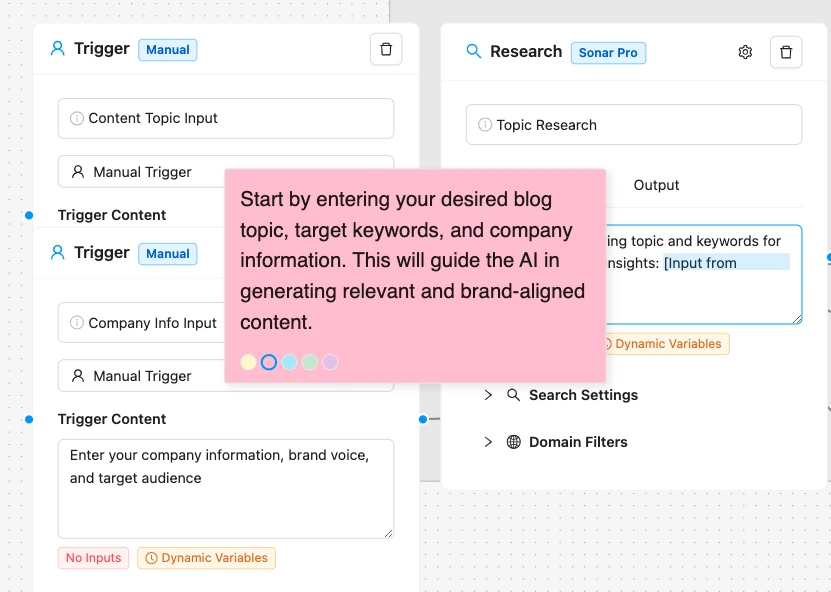
Step 1: Trigger Setup
Begin by configuring the WordPress Core Trigger node. This step involves setting up the workflow to initiate at predetermined times or on-demand. The plugin’s scheduling feature allows for flexible timing, ensuring that your content production aligns with your posting schedule.
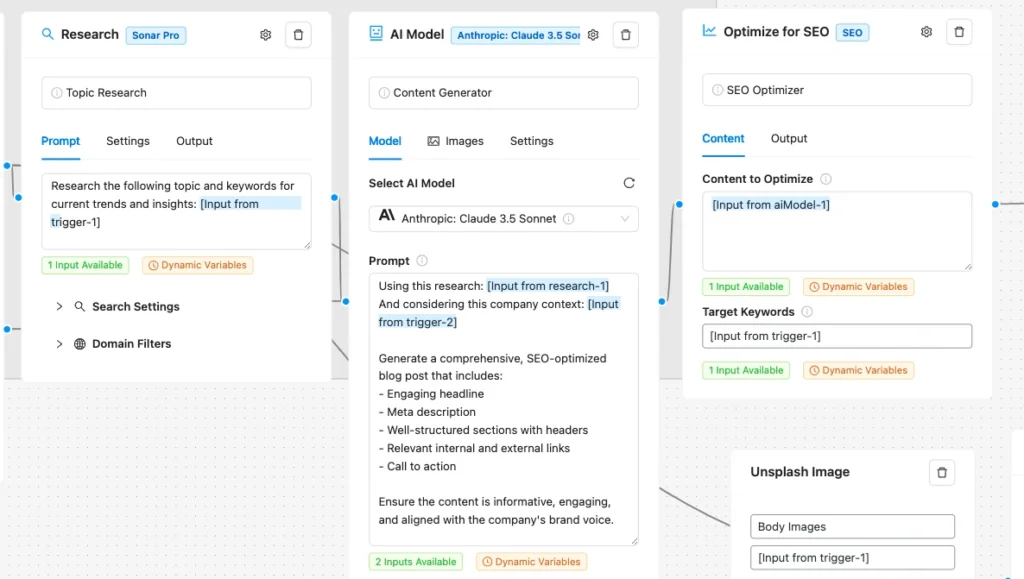
Step 2: AI Model Configuration
With the AI Model Node – Write Article, define the parameters for your content generation. Specify your desired keywords, article length, and style to ensure that the produced content meets your SEO and engagement goals. This is where Agentic AI shines, crafting articles that resonate with your audience.
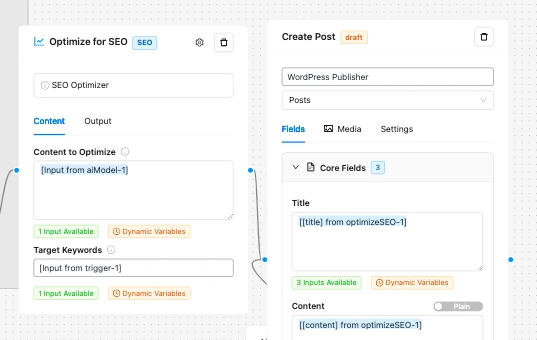
Step 3: Action Implementation
Next, integrate the Unsplash Integration node to automatically select and include high-quality images in your posts. This step enhances the visual appeal of your content, making it more shareable and engaging. Finally, use the API Call Node to publish your content directly to WordPress, managing categories, tags, and custom fields as needed.
Customizing Your Automated Content Generation Workflow
To tailor the workflow to your specific needs, consider the following customizations:
-
- SEO Optimization: Adjust the settings within the Write Article node to focus on specific SEO keywords and phrases.
-
- Content Scheduling: Use the scheduling capabilities of the WordPress Core Trigger to spread out your content publication, preventing bulk posting and maintaining a natural flow.
-
- Image Selection: Fine-tune the Unsplash Integration to match images more closely with your article’s theme and tone.
For more inspiration and templates, explore the workflow templates provided by the AI Workflow Automation plugin.
How Agentic AI Executes Tasks
Agentic AI within the plugin operates by understanding the context and requirements of each task. It uses sophisticated algorithms to generate content, select images, and manage the publishing schedule, all while adapting to the specific needs of your WordPress site. This level of automation not only saves time but also ensures that your content strategy remains consistent and effective.
Business Value of Agentic AI in Content Automation
By implementing an AI Agent for content automation, businesses and bloggers can significantly reduce the time and effort required to produce and publish posts. This streamlining of content production allows for greater focus on strategic planning and audience engagement, ultimately enhancing the consistency and quality of your output.
Conclusion
The integration of Agentic AI into your WordPress content generation workflow through the AI Workflow Automation plugin represents a transformative step towards more efficient and effective content management. By automating the entire process from content generation to scheduled publishing, you can maintain a high-quality blog with minimal manual intervention, freeing up time to focus on what matters most—growing your audience and achieving your business goals.