To turn RSS feeds into original WordPress posts with AI, you trigger a workflow on each new feed item, have the AI rewrite and expand it into unique content, then save it as a draft. AI Workflow Automation, a free WordPress plugin, does this inside your dashboard and, used responsibly with editorial review, avoids the thin, duplicate output that gets autoblogs penalized.
I build and maintain that plugin, so I get asked about feed automation constantly. The mechanics are easy. The editorial discipline is what decides whether the output ranks or gets ignored.
AI Workflow Automation is a free WordPress plugin with a visual drag-and-drop builder that runs AI workflows, agents, and chatbots inside your own site, using your own API keys, with no external subscription required.
How does RSS-to-post automation actually work?
RSS-to-post automation is a four-stage pipeline: poll, transform, create, review. A trigger polls a feed URL on an interval, the new items enter a workflow as structured data, an AI step turns that data into a full draft, and a post step writes the draft into WordPress.
The feed itself is the reason this works so cleanly. RSS 2.0, frozen at version 2.0.11 by the RSS Advisory Board since March 2009, is a stable XML format where every channel must carry a title, link, and description, and every item carries at least a title or a description. You are not scraping HTML that changes shape every quarter. You are reading a contract.
In AI Workflow Automation, the RSS Feed trigger exposes each item as named fields you can reference downstream: title, link, description, content, pubDate, author, and categories. Every later node can pull any of those individually rather than receiving one undifferentiated blob.
Why does raw RSS reposting hurt your SEO?
Republishing feed items verbatim is explicitly named in Google’s spam policies. Google’s scaled content abuse policy lists “scraping feeds, search results, or other content to generate many pages (including through automated transformations like synonym replacements)” as an example of the abuse it acts on. Sites that violate the policy “may rank lower in results or not appear in results at all.”
Two details in that policy matter more than people expect. Google states it applies “no matter whether content is produced through automation, human efforts, or some combination,” so adding an AI step is not a loophole. And “automated transformations like synonym replacements” is called out by name, so a workflow whose only job is to reword a press release produces exactly the output the policy targets.
The line I use when advising people: a duplicate post repeats what the source said, an original post says something the source did not. Everything below is about engineering that difference into the workflow rather than hoping the model supplies it.
How do you build the feed-to-post workflow?
Here is the build as I set it up, using the real node names in the builder. Open AI Workflows in your WordPress admin menu and create a new workflow.
- Add a Trigger node and choose RSS Feed from the External group. Paste the feed address into RSS Feed URL and press Preview to confirm the plugin can parse it before you build anything on top.
- Set Update Interval. The dropdown offers 5 minutes, 15 minutes, 30 minutes, 1 hour, 6 hours, 24 hours, or “Use Schedule to Trigger.” For a news feed I use 1 hour. For a weekly industry digest, 24 hours is plenty and costs you nothing in wasted model calls.
- Narrow the feed with Filters. “Title contains” and “Content contains” are the highest-leverage settings in the whole workflow: a filter that only admits items matching your actual beat stops the AI writing about things your readers never asked for. Set Max items (1 to 50 per poll) low, and turn on Include full content if the publisher puts the whole body in the feed.
- Add a Write an Article node. In the Content field, write instructions, not a rewrite request. Reference the trigger fields with variable tags so the model gets structured input. Set Word count to your target (the field accepts 100 to 10,000, default 1,000) and use Writing style to lock tone.
- Add an AI Optimize for SEO node after it. Feed it the article output and put your target terms in the SEO keywords field, comma separated. This is a finishing pass, not a substitute for a good first draft.
- Add a Human Input node set to Approval Required or Modification Required, assigned to a user or a role. The workflow pauses here until a person acts.
- Add a Create Post/Product node. Set Post type to
postand Post status todraft. Mappost_titleandpost_contentfrom separate upstream outputs. Those two are distinct required inputs, so do not wire one plain AI text block into both and invent field tags it does not produce.
On cost: the RSS Feed trigger and the Create Post/Product node are both zero credits, and in local mode the AI steps run on your own OpenAI, Anthropic, or OpenRouter key, so you pay the provider directly and nothing routes through anyone else’s server.
How do you make each post genuinely unique?
Uniqueness comes from adding an input the source item does not contain. There are four inputs that reliably work, and prompt wording is the weakest of them.
| Approach | What the reader gets | Duplicate risk |
|---|---|---|
| Reword the feed item | The same facts in different words | High. This is the pattern Google’s policy names. |
| Summarise several items into one post | A synthesis that exists nowhere else | Moderate, and lower as the item count rises. |
| Add your own analysis or position | An opinion tied to your expertise | Low, if the analysis is specific. |
| Add first-party data or examples | Information no competitor can copy | Lowest. This is the only durable moat. |
The practical version of row four inside the builder: write the Write an Article instructions so the model is required to produce something the feed did not supply. Instead of “rewrite this article,” I use a Content field along the lines of “Using the source item below as the news hook only, write a piece for WordPress site owners explaining what this change means for them in practice. Open with the implication, not the announcement. Include a concrete example. Do not restate the source paragraph by paragraph.”
Then add the one thing a model cannot invent: your angle. A Human Input node set to Modification Required puts a text box in front of an editor before publication, and two sentences of real practitioner commentary there beat another 400 generated words.
How do you add your own images, sources, and citations?
Feed items rarely carry images you are licensed to reuse, so generate or source your own. The Unsplash Image Search node pulls a properly licensed photo and the Multimedia Generator node produces an original image from a prompt, and either output maps into the Create Post/Product node alongside the post body.
For citations, use the trigger’s link field. I map it into the article instructions so the draft closes with an attribution line pointing at the original. An outbound link to the primary source is a quality signal, not a leak.
If you want real depth rather than a rephrasing, add a Research node between the trigger and the article step so the draft is built from several sources instead of one. That single change is usually what moves a feed-driven post from thin to worth reading.
What review guardrails should you put in before publishing?
Three guardrails, in order of how much trouble they save you.
Publish to draft, always. Post status draft means the worst outcome of a bad run is a bad draft nobody sees. I have never regretted this setting and I have regretted skipping it.
Route through a human. The Human Input node assigns the review to a user or a role, sends an email notification, and holds the workflow until someone approves, edits, or reverts. Approval tasks give you two decision paths, approve and revert, so a rejected item simply stops.
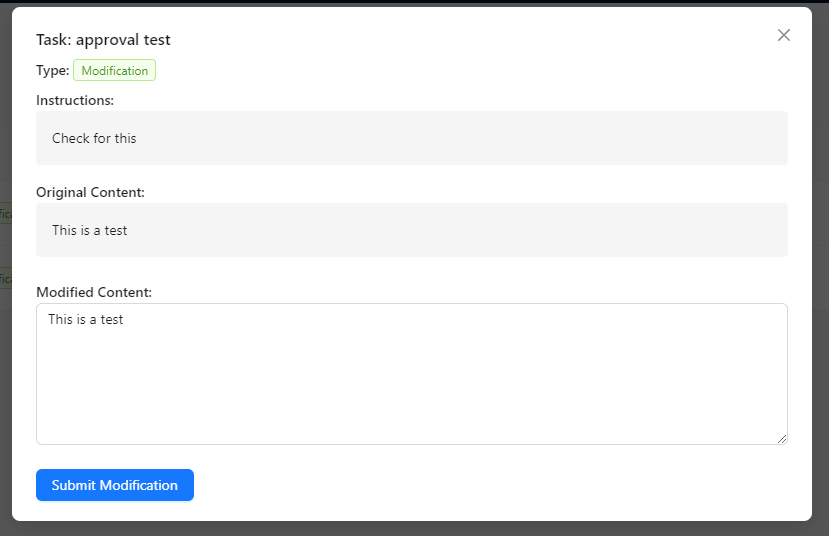
Tasks appear under the Tasks menu in the WordPress admin sidebar. One setup detail catches people out: task access is role based and must be enabled in AI Workflows, Settings, Task Management Access. Administrators have it by default, everyone else needs it granted explicitly.
Keep volume honest. Max items is capped at 50 per poll for a reason. If your workflow is producing more posts per week than a human can meaningfully review, you have stopped running a publication and started running a content farm, and Google’s policy is aimed squarely at the difference.
What are the legal and attribution rules for republishing feeds?
An RSS feed being publicly available is not a licence to republish it. The feed is a distribution mechanism, not a copyright grant, and the underlying text stays with its author unless the publisher says otherwise.
Check the source site for an explicit syndication or reuse policy before you automate against it. Some publishers grant reuse with attribution, some grant headline and excerpt only, and some grant nothing. When in doubt, treat the item as a fact source rather than a text source: facts are not copyrightable, the specific expression of them is.
Attribution belongs visibly in the published post and should link to the original item URL from the feed’s link field. If your workflow cannot produce a post you would be comfortable showing to the original author, it is doing the wrong job.
Frequently asked questions
Is AI autoblogging from RSS against Google’s guidelines?
Automation itself is not against Google’s guidelines. Google’s spam policies target scaled content abuse, defined as generating many pages primarily to manipulate rankings rather than help users, and they explicitly cover content produced by automation, humans, or both. A feed-driven workflow that adds analysis, original examples, and editorial review is judged on that value. One that rewords feed items at volume is the exact pattern the policy names.
How often should the RSS trigger poll a feed?
Match the interval to how often the source publishes. The RSS Feed trigger offers 5 minutes, 15 minutes, 30 minutes, 1 hour, 6 hours, 24 hours, or “Use Schedule to Trigger.” Hourly suits an active news feed, and 24 hours suits a weekly or monthly publisher. Polling faster than the source publishes only burns runs. Interval polling is most reliable in cloud mode.
Can I combine several RSS feeds into one WordPress post?
Yes, and it is usually the better use of the pattern. Rather than one post per feed item, run the trigger on a longer interval with a higher Max items value and have the Write an Article node synthesise a roundup from the batch. A synthesis of ten items is original by construction, since that combination exists nowhere else, and it gives readers something a single republished item never can.
Do I need a paid plan to build an RSS-to-post workflow?
No. The builder, the RSS Feed trigger, the AI nodes, and the Create Post/Product node all run locally on your WordPress site with your own provider API key. The RSS trigger and the post node cost zero credits, and in local mode the AI steps bill to your own OpenAI, Anthropic, or OpenRouter account rather than to a subscription.
Building it yourself
Install AI Workflow Automation from the WordPress plugin directory, add an RSS Feed trigger, and wire it to a Write an Article node and a Create Post/Product node set to draft. That is a working pipeline in about ten minutes. The part that takes longer, and matters more, is deciding what your version of each item is going to say that the source did not.
More worked examples of AI-assisted publishing live in the Content Creation archive.