Skip to content
wpaiworkflowautomation-logo AI Workflow Automation
  • Demos
  • Overview
  • Features
  • Price
  • Documentation
  • Blog
Download free
  • Demos
  • Overview
  • Features
  • Price
  • Documentation
  • Blog
Download free

Introduction

3
  • Overview of AI Workflow Automation Pro
  • Key Features and Benefits
  • System Requirements

Installation and Activation

2
  • How to Install AI Workflow Automation Pro
  • Initial Setup and Configuration

Getting Started

4
  • Welcome Screen & Templates Modal
  • Understanding AI Workflow Automation WordPress plugin: A Deep Dive
  • Quick Start Guide
  • Understanding the User Interface

Core Concepts

6
  • Workflows Explained
  • Nodes and Their Types
  • Edges and Connections
  • Triggers and Actions
  • Data Flow and Variable Handling
  • Execution and Scheduling

Node Types

16
  • MCP Node
  • Create File Node
  • Multimedia Generator Node
  • Chat Node
  • API Call Node
  • Unsplash Image Search Node
  • Trigger Nodes
  • AI Model Node
  • Specialized AI Nodes
  • Output Node
  • Human Input Node
  • Condition Node
  • Post Node
  • Send Email Node
  • Web Scraper/Crawler node
  • Parser Node

Trigger Nodes

8
  • Ninja Forms Integration
  • WPForms Integration
  • Contact Form 7 Integration
  • RSS Trigger Node
  • Gravity Forms Trigger
  • Webhook Trigger
  • WordPress Core Trigger
  • Workflow Trigger

AI Nodes

6
  • Research Node
  • Sentiment Analysis Node
  • Summary Generator Node
  • Extract Information Node
  • Write Article Node
  • Optimize SEO Node

Output Nodes

5
  • Save to Google Sheets
  • Save to Google Drive
  • Save to Database
  • Webhook Output
  • HTML/Shortcode Output

Building Workflows

2
  • Step-by-step Guide to Creating Workflows
  • Automatically generate a content creation workflow using AI-Powered workflow generator

Advanced Features

4
  • Cost Management
  • Retrieval-Augmented Generation (RAG)
  • Annotation Tools
  • Workflow Import/Export

API Documentation

2
  • Google Integration Setup
  • API Settings and Integrations

FAQ

1
  • Security Overview
View Categories
  • Home
  • Docs
  • Node Types
  • Human Input Node

Human Input Node

4 min read

Overview #

The Human Input Node allows you to incorporate human decision-making and review processes into your automated workflows. This powerful feature enables you to create approval workflows, request content modifications, and ensure human oversight at critical points in your automation.

Key Features #

  • Two types of human input: Approval and Modification
  • Flexible task assignment to specific users or entire roles
  • Email notifications for assigned tasks
  • Dedicated task management interface
  • Role-based access control for task management
  • Real-time task status updates

Setting Up Task Permissions #

Configuring Role Access #

Before using the Human Input Node, you need to configure which roles have access to view and action tasks:

  1. Go to AI Workflows → Settings
  2. Navigate to the “Task Management Access” section
  3. Select the roles that should have task access
  4. Click “Save Settings”

Note: Administrators always have task access by default.

task management access control

Important Points About Permissions: #

  • Only users with task access can be assigned tasks
  • Only roles with task access will appear in the role selection dropdown
  • Users must have appropriate roles to view and action tasks
  • Task access is separate from workflow management access

Using the Human Input Node #

Basic Configuration #

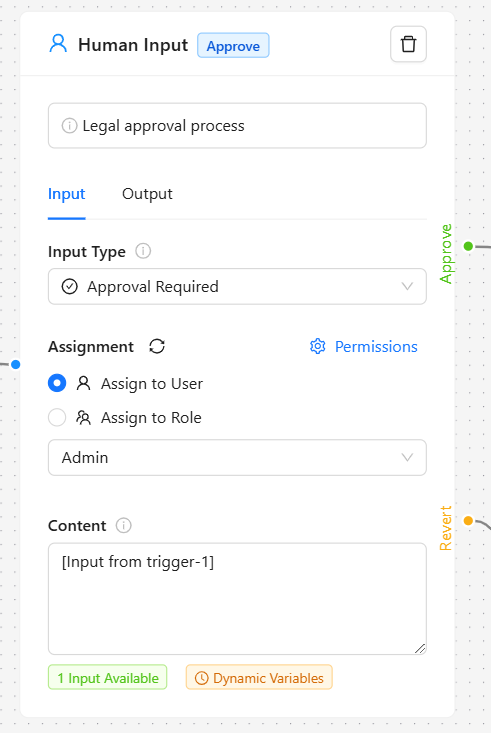
  1. Node Name: Give your node a descriptive name that indicates its purpose in the workflow.
  2. Input Type Selection:
  • Approval Required: Use when you need a yes/no decision
  • Modification Required: Use when content needs to be reviewed and potentially changed

Assignment Options:

    • Assign to User: Task is assigned to a specific user
    • Assign to Role: Task is assigned to all users with the selected role
    human input node ai workflow automation

    Configuration Tips #

    • For Approval Tasks:
    • Keep the content clear and concise
    • Include all necessary context for decision-making
    • Consider adding decision criteria in the content
    • For Modification Tasks:
    • Provide clear instructions about what needs to be reviewed/modified
    • Include any specific guidelines or requirements
    • Use the instructions field to provide additional context

    Node Outputs #

    The Human Input Node provides different outputs based on the input type:

    Approval Type:

    • Approve path: Content flows through when approved
    • Revert path: Content flows through when reverted

    Modification Type:

    • Single output path with the modified content

    Managing Tasks #

    Accessing Tasks #

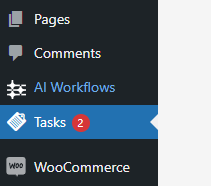
    Users with task access can find their tasks in two ways:

    • Through the “Tasks” menu item in the WordPress admin menu
      tasks menu ai workflow automation
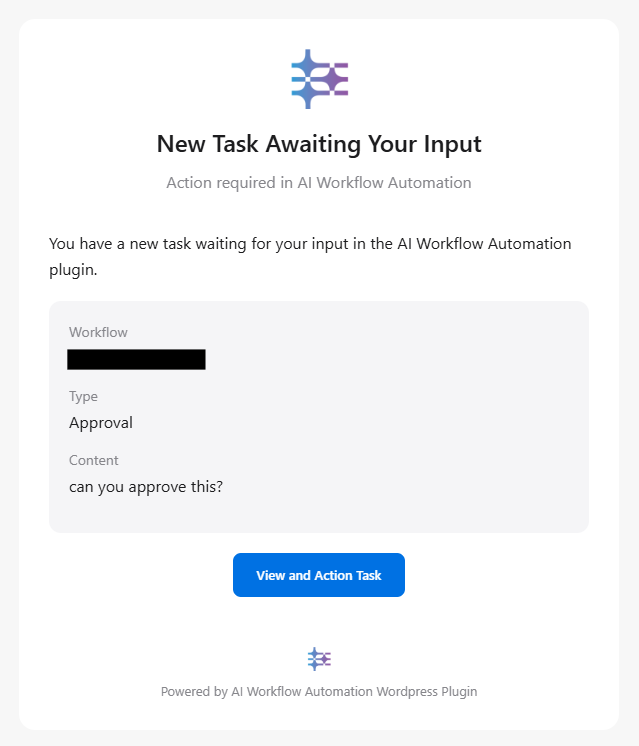
      • By clicking on task notifications received via email
      tasks email notification ai workflow automation

        Task Interface Features #

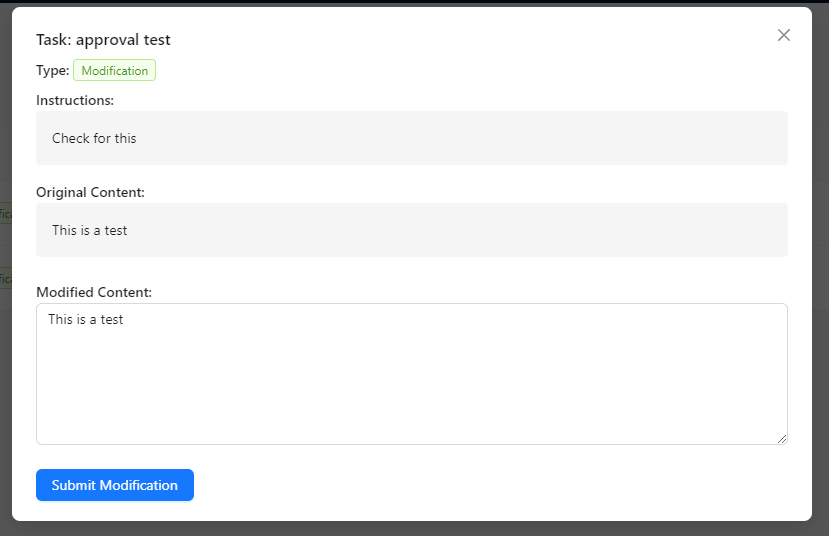
        The task interface shows:

        • Workflow name
        • Task type (Approval/Modification)
        • Content to review
        • Instructions (for modification tasks)
        • Task status
        • Creation and due dates
        human input node task interface ai workflow automation

        Actioning Tasks #

        For Approval Tasks:

        1. Review the provided content
        2. Choose to either:
        • Click “Approve” to accept the content
        • Click “Revert” to reject the content
        1. Add optional comments explaining your decision

        For Modification Tasks:

        1. Review the content and instructions
        2. Make necessary modifications in the content editor
        3. Click “Submit” to save your changes
        4. Add optional comments about your modifications

        Task Notifications #

        • Users receive email notifications when tasks are assigned to them
        • Notifications include:
        • Task type and workflow name
        • Direct link to the task
        • Content preview
        • Instructions (for modification tasks)

        Best Practices #

        1. Clear Naming
        • Use descriptive node names that indicate the purpose
        • Example: “Legal Review Approval” or “Content Quality Check”
        1. Appropriate Assignment
        • Assign to specific users for critical decisions
        • Use role assignments for general reviews or when multiple people can handle the task
        1. Content Preparation
        • Provide sufficient context in the content
        • Include clear instructions for modification tasks
        • Consider the reviewer’s perspective when preparing content
        1. Workflow Design
        • Place Human Input Nodes at logical decision points
        • Consider what happens in both approve and revert scenarios
        • Plan for potential delays in human response

        Troubleshooting #

        Common Issues and Solutions #

        1. Users Can’t See Tasks
        • Check if the user has the correct role
        • Verify role has task access in settings
        • Ensure proper task assignment
        1. Task Notifications Not Received
        • Check spam folder
        • Verify user email is correct
        • Check WordPress email settings
        1. Can’t Assign to Users/Roles
        • Verify task permissions are configured
        • Check if users have appropriate roles
        • Ensure roles have task access enabled

        Getting Help #

        If you encounter issues:

        1. Check the plugin settings
        2. Review task permissions
        3. Contact support at support@wpaiworkflowautomation.com

        Examples #

        Approval Workflow Example #

        Trigger → AI Content Generation → Human Input (Approval) → 
        ├─ Approve → Publish Content
        └─ Revert → Notify Content Team

        Content Modification Example #

        Trigger → AI Draft → Human Input (Modification) → Format Content → Publish

        Technical Notes #

        • Tasks are stored in a dedicated database table
        • Email notifications use WordPress mail system
        • Task status updates trigger workflow progression
        • Real-time updates in the admin menu task counter
        Updated on January 7, 2025

        What are your Feelings

        • Happy
        • Normal
        • Sad
        Share This Article :
        • Facebook
        • X
        • LinkedIn
        • Pinterest
        Table of Contents
        • Overview
        • Key Features
        • Setting Up Task Permissions
          • Configuring Role Access
          • Important Points About Permissions:
        • Using the Human Input Node
          • Basic Configuration
          • Configuration Tips
          • Node Outputs
        • Managing Tasks
          • Accessing Tasks
          • Task Interface Features
          • Actioning Tasks
          • Task Notifications
        • Best Practices
        • Troubleshooting
          • Common Issues and Solutions
          • Getting Help
        • Examples
          • Approval Workflow Example
          • Content Modification Example
        • Technical Notes
        wpaiworkflowautomation-logo AI Workflow Automation
        +--+  +--+
        |  *--+  |
        +--+  +--+
        |  +--*  |
        +--+  +--+

        Agentic AI workflows, built visually inside WordPress. Free and open to build on — cloud when you need the muscle.

        Product

        • Features
        • How it runs
        • Pricing
        • Credits

        Resources

        • Case Study
        • Blog Posts
        • E-commerce
        • Content Creation
        • Real Estate
        • Finance
        • Education
        • Guide

        Company

        • Contact
        • Affiliates

        Legal

        • Privacy Policy
        • Terms and Conditions
        • Cookie Policy (UK)
        • Cookie Policy (EU)
        automation
        © 2026 AI Workflow Automation wpaiworkflowautomation.com
        Manage Consent
        To provide the best experiences, we use technologies like cookies to store and/or access device information. Consenting to these technologies will allow us to process data such as browsing behavior or unique IDs on this site. Not consenting or withdrawing consent, may adversely affect certain features and functions.
        Functional Always active
        The technical storage or access is strictly necessary for the legitimate purpose of enabling the use of a specific service explicitly requested by the subscriber or user, or for the sole purpose of carrying out the transmission of a communication over an electronic communications network.
        Preferences
        The technical storage or access is necessary for the legitimate purpose of storing preferences that are not requested by the subscriber or user.
        Statistics
        The technical storage or access that is used exclusively for statistical purposes. The technical storage or access that is used exclusively for anonymous statistical purposes. Without a subpoena, voluntary compliance on the part of your Internet Service Provider, or additional records from a third party, information stored or retrieved for this purpose alone cannot usually be used to identify you.
        Marketing
        The technical storage or access is required to create user profiles to send advertising, or to track the user on a website or across several websites for similar marketing purposes.
        Manage options Manage services Manage {vendor_count} vendors Read more about these purposes
        View preferences
        {title} {title} {title}
        Manage Consent
        To provide the best experiences, we use technologies like cookies to store and/or access device information. Consenting to these technologies will allow us to process data such as browsing behavior or unique IDs on this site. Not consenting or withdrawing consent, may adversely affect certain features and functions.
        Functional Always active
        The technical storage or access is strictly necessary for the legitimate purpose of enabling the use of a specific service explicitly requested by the subscriber or user, or for the sole purpose of carrying out the transmission of a communication over an electronic communications network.
        Preferences
        The technical storage or access is necessary for the legitimate purpose of storing preferences that are not requested by the subscriber or user.
        Statistics
        The technical storage or access that is used exclusively for statistical purposes. The technical storage or access that is used exclusively for anonymous statistical purposes. Without a subpoena, voluntary compliance on the part of your Internet Service Provider, or additional records from a third party, information stored or retrieved for this purpose alone cannot usually be used to identify you.
        Marketing
        The technical storage or access is required to create user profiles to send advertising, or to track the user on a website or across several websites for similar marketing purposes.
        Manage options Manage services Manage {vendor_count} vendors Read more about these purposes
        View preferences
        {title} {title} {title}