Human handoff
Human handoff lets your chatbot hand a conversation to a real person. While a human is in control, the bot stops answering and only relays messages between the visitor and your team. When the person resolves the handoff, control returns to the bot.
You configure handoff on the Handoff tab of the Chatbot node.
Turn it on
Switch on Human handoff, then choose where handed-off conversations go.
Providers
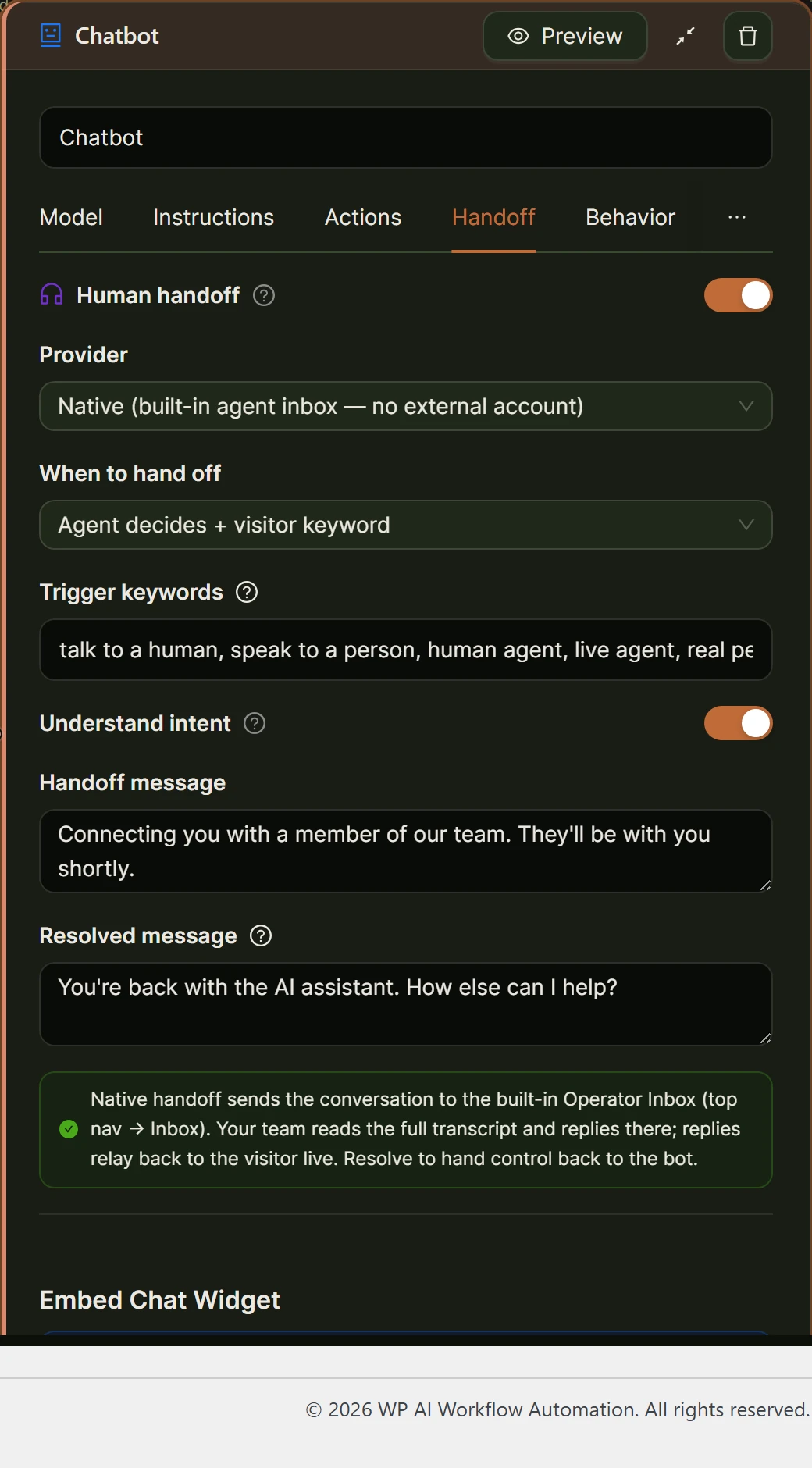
- Native (built-in agent inbox). No external account needed. The conversation goes to the Operator Inbox inside wp-admin, where your team reads the transcript and replies. You can set the WordPress role that gets assigned.
- Chatwoot. Route conversations into a Chatwoot inbox.
- Zendesk Sunshine Conversations. Route into Sunshine Conversations.
- Intercom. Route into Intercom and assign to a teammate or a team.
When a handoff starts
Pick the trigger:
- Agent decides plus visitor keyword (default): both paths are active.
- Agent decides only: the agent chooses when to escalate.
- Visitor keyword only: only an exact keyword starts a handoff.
For keyword triggers, enter comma-separated phrases such as talk to a human, speak to a person, live agent. If a visitor message contains any of them, a handoff starts.
You can also enable natural-language intent detection. It catches requests phrased in the visitor’s own words, like “can I speak to someone,” even without an exact keyword. Keywords stay the fast path; intent adds one cheap classification only when a message looks like it might be asking for a person, and it falls back to keywords if it fails.
Messages the visitor sees
- Handoff message: shown when the conversation is being handed off, for example “Connecting you with a member of our team.”
- Resolved message: shown when an operator resolves and control returns to the bot, for example “You are back with the AI assistant. How else can I help?”
Connecting an external provider
External providers relay operator replies back to the visitor through an inbound webhook. Each provider panel shows the exact inbound webhook URL to register on their side. Credentials you enter are stored encrypted.
Chatwoot
Enter your Chatwoot base URL, account id, inbox id, and API access token, plus a shared webhook secret. Then register the inbound webhook URL shown in the panel inside Chatwoot.
Zendesk Sunshine Conversations
Enter your Sunshine Conversations credentials, then register the inbound webhook URL shown in the panel.
Intercom
Enter your Intercom access token and region (US, EU, or AU), the acting admin id, and whether to assign to a teammate or a team along with that id. Add your app client secret so inbound signatures can be verified, then register the inbound webhook URL for the conversation.admin.replied topic.
Resuming the bot
When the operator resolves the handoff (in the Operator Inbox for Native, or by closing the conversation in the external tool), the visitor sees your resolved message and the bot takes over again.