Newsroom automation is the use of software, AI included, to pull in incoming stories, produce a first-pass draft, and route it to a named editor before it reaches readers. On WordPress, AI Workflow Automation, a free plugin, builds this as a visual pipeline: an RSS or webhook trigger brings in the item, an AI node drafts it, and a Human Input node holds the draft for an editor to approve, edit, or reject.
Most of what ranks for newsroom automation today describes broadcast rundown software built for a TV control room. A WordPress newsroom, a niche news site, or a single reporter running a blog needs something narrower: a way to turn an RSS feed or a wire-style webhook into a reviewed draft, with no step that publishes on its own.
AI Workflow Automation is a free WordPress plugin with a visual drag-and-drop builder that runs AI workflows, agents, and chatbots inside your own site, using your own API keys, with no external subscription required. This piece covers one workflow inside it: intake, draft, editor review, and a WordPress draft post, in that order, with nothing skipped.
What is a newsroom automation system, and where does AI actually fit?
A newsroom automation system is the chain of tools that move a story from an incoming source, a wire feed, a press release, an RSS item, through drafting and into a publishable article. AI fits at one link: turning raw source text into a readable first draft. It does not belong at intake, where a human still sets the feeds and filters, or at publishing, where a person still says a story is ready.
The risk is not the drafting step, it is skipping the step after it. A model summarizing a wire item can state something confidently that the source text never said, and the only reliable place to catch that is a human reading the draft against the source. Automated news writing without that read-through is unreviewed publishing with extra steps.
How does RSS and wire-style intake work in a WordPress workflow?
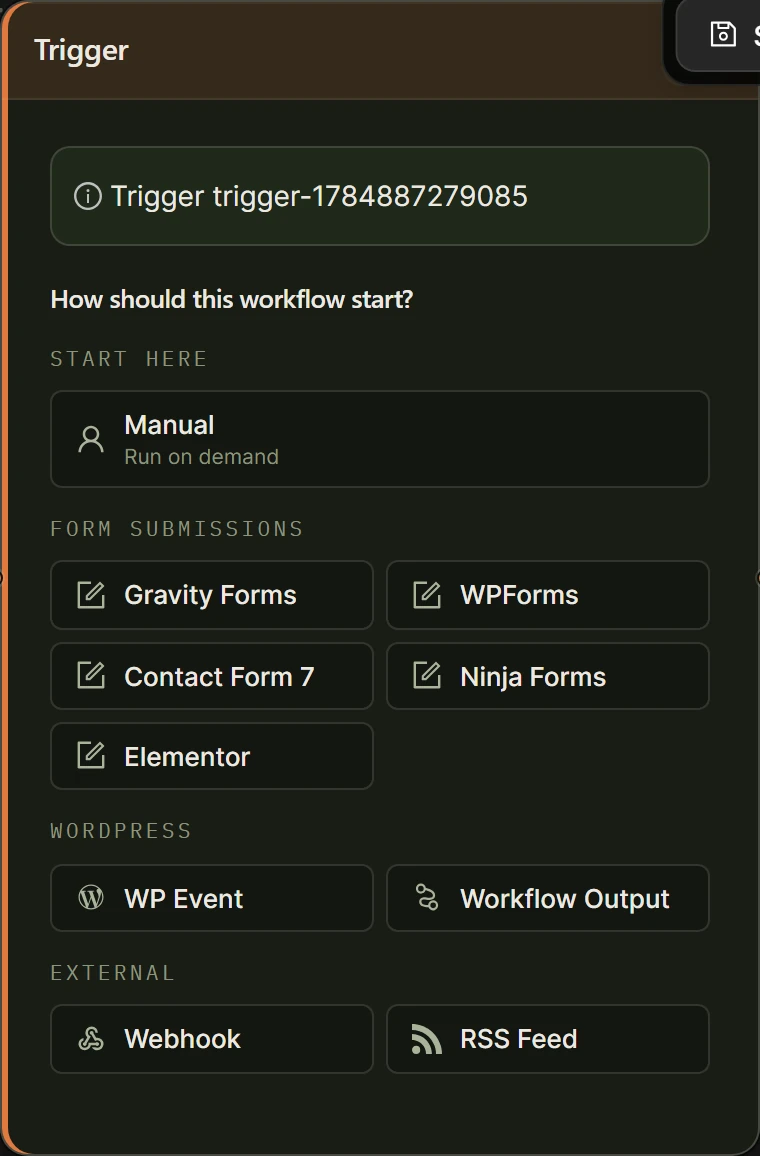
RSS intake runs through a Trigger node set to RSS Feed: give it a feed URL, and the plugin polls it on an interval from every five minutes up to every 24 hours, running the workflow once per new item. A wire service without native RSS usually still exposes a feed or a webhook you can point at the same trigger, so the intake mechanics do not change.
Each item exposes named fields: title, link, description, content, pubDate, author, and categories. Add a Filter, Title contains or Content contains, when a feed covers more ground than one workflow should react to. Set Max items per poll, and turn on Include full content if summaries alone are not enough to draft from. See our guide to publishing RSS items to WordPress with AI for the field-mapping details this piece assumes.
How do you build a workflow that always drafts and never auto-publishes?
A draft-only workflow chains four kinds of node: an RSS trigger for intake, an AI node for the first draft, a Human Input node for review, and a Create Post/Product node set to draft status. Nothing in that chain sets a post to Publish, so a human always decides when a story goes live.
Add your OpenAI or OpenRouter key under Settings first. This walkthrough runs in Local mode, at no cost beyond your provider’s own token charges.
- Create a new workflow in AI Workflows in wp-admin and name it after the feed it watches, for example “Wire desk: press releases”.
- Add a Trigger node, choose RSS Feed, paste the feed URL, and click Preview to confirm it loads and shows recent titles.
- Set the Update Interval and add a Filter, such as Title contains, if this workflow should only react to part of the feed.
- Drag on an AI Prompt node and write a prompt that summarizes and sets expectations: “Summarize this wire item in plain language for our readers. Flag anything you cannot verify from the text alone. [[content] from trigger-1]”.
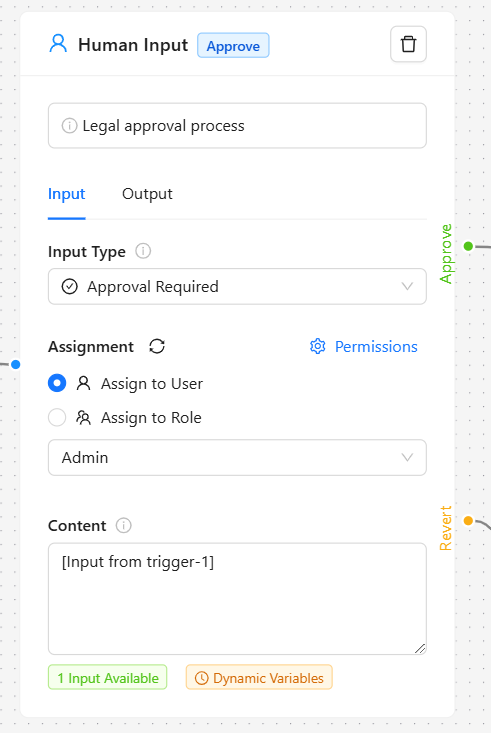
- Drag on a Human Input node, set Input Type to Modification Required, and assign it to a specific editor, or a role such as Editor, rather than to anyone with plugin access.
- Drag on a Create Post/Product node, set Post type to post and Post status to draft, then map post_title to [[title] from trigger-1] and post_content to the Human Input node’s output, inserted with the forward-slash variable picker, not the AI node’s raw draft.
- Save the workflow. An active RSS trigger polls on its own interval, so this workflow needs no separate schedule.
- Run it once manually against a real item, and watch the live execution panel to see what the AI node produced.
How does an editor actually review a draft before it publishes?
An editor reviews a pending draft on the Tasks page in the WordPress admin menu, where Human Input tasks collect with a live counter, or through the direct link the plugin emails the moment a task is assigned. Set to Modification Required, the task lets the editor rewrite the draft in place, and that edited version continues down the workflow.
The Create Post/Product node’s draft status is a second safety net: the story exists as an unpublished draft even after approval, so a rushed review still leaves a human click between it and the front page. Assign each task to a named person for anything that matters, and reserve role assignment for lower-stakes review. The task interface shows the content to review and a field for comments, worth using on every task, not only the ones you reject.
Should an AI-assisted article be labeled for readers?
Readers do not need to see workflow mechanics, but most current newsroom AI policy leans toward disclosing when a story used generative AI. Google’s own guidance treats disclosure as a trust signal, not a ranking requirement, and judges content on whether it is accurate and useful, not on how it was produced: “If you use automation, including AI-generation, to produce content for the primary purpose of manipulating search rankings, that’s a violation of our spam policies,” Google’s Search Central documentation states, in guidance last updated 10 December 2025.
AI drafting is common enough now that a disclosure line is close to standard practice, not an edge case. In a survey of 326 news industry leaders across 51 countries, published 9 January 2025, the Reuters Institute for the Study of Journalism found: “The vast majority (87%) say that newsrooms are being fully or somewhat transformed by Gen AI, with just 13% saying not so much.” A simple line under a byline, “Drafted with AI assistance, edited and approved by [name],” costs nothing to add and matches what the editor already did in review.
What happens when an AI-assisted draft turns out to be wrong after it publishes?
A correction on an AI-assisted story works the same as any other correction: fix the post, note what changed, and say so visibly if the error was substantive rather than editing it quietly. What differs is where you look for the cause. An AI-drafted error is usually the model stating something confidently that the source text did not support, exactly what the Human Input review step exists to catch first. Reviewer comments logged on each task are the fastest way to tell, later, whether a fault sat with the model, the editor’s read-through, or the original wire item.
What should a WordPress newsroom not automate yet?
A site with one or two feeds does not need a workflow at all. Skimming the feed by hand and writing the piece is faster than building and maintaining an automation for it. Automation earns its place once enough regular sources exist that checking each one by hand becomes the bottleneck, not the writing. And keep the Post node’s status set to draft even when a publish-on-approve setup feels faster: it is tempting to wire a webhook straight through to a published post, but that removes the one step that catches a wrong fact before a reader does.
| Stage | Node | What happens | Credits in Cloud |
|---|---|---|---|
| Intake | RSS Trigger | Polls the feed, exposes title, link, description, content, pubDate, author, categories | 0 |
| Draft | AI Prompt | Writes a plain-language first draft and flags anything unverifiable | 2 |
| Review | Human Input, Modification Required | Named editor edits or rejects the draft before anything moves on | 0 |
| Save | Create Post/Product, status draft | Saves the edited text as a WordPress draft, not a published post | 0 |
Frequently asked questions
Does AI Workflow Automation publish news stories on its own?
No, not unless you build it that way. The plugin’s nodes allow a Create Post/Product node set to publish with nothing in between, but a newsroom workflow should set Post status to draft and add a Human Input node before it, so a story only goes live after a named editor reviews it. Automatic publishing is a configuration choice, not a default.
Can a WordPress AI workflow monitor RSS feeds and wire services automatically?
Yes. An RSS Trigger node polls a feed URL on an interval from five minutes to 24 hours and runs the workflow once per new item, exposing the title, link, description, full content, publish date, author, and categories as separate fields. A wire service that exposes a feed or a webhook, rather than classic RSS, connects the same way, and polling is most reliable in Cloud mode.
How is an AI first draft different from fully automated news writing?
An AI first draft is one input into a story that a person still edits and approves before it becomes a published post. Fully automated news writing, drafting and publishing with no review, is technically possible with the same nodes by skipping Human Input and setting the Post node to publish directly, but that removes the fact-check step this guide is built around. The workflow design decides which one you get.
Who should be assigned to review AI-drafted stories before they publish?
A named editor, not a role that any logged-in user can claim, for anything running under your outlet’s name. The Human Input node supports assigning a task to a specific user or to an entire role, and role assignment suits lower-stakes review where several people share the duty. Anything with a factual claim a reader might act on should go to one named person.
Building this in WordPress starts with the free plugin and your own AI provider key, no cloud account required for the workflow described here. Install AI Workflow Automation from the WordPress plugin directory, and see the full node catalog for content workflows on the Content Creation hub.