To optimize WordPress content for ChatGPT search and Perplexity, make sure OpenAI’s OAI-SearchBot and Perplexity’s PerplexityBot can actually crawl your site, put a direct answer in the first two sentences of each page, and write your facts so a single sentence can be lifted as a standalone quote. Both engines favor extractable, well-sourced passages over long, discursive ones.
Google’s AI Overviews get most of the attention, but ChatGPT search and Perplexity pull from a different pool of pages using different signals, so a page that ranks well in Google can still go unquoted by either one. AI Workflow Automation is a free WordPress plugin with a visual drag-and-drop builder that runs AI workflows, agents, and chatbots inside your own site, using your own API keys, with no external subscription required. This guide covers three things that decide whether either engine quotes a page: crawler access, passage structure, and where else the claim gets repeated.
How do ChatGPT search and Perplexity choose which pages to cite?
ChatGPT search and Perplexity both work the same basic way: they run a live web search, pull back a shortlist of pages, read the passages that answer the query, and write a response that cites some of those pages by name. Neither uses Google’s ranking formula, and neither guarantees a citation just because a page ranks on page one organically.
What tends to separate the pages that get quoted from the ones that get skipped is not domain authority alone. It is whether the page can be reached, whether it answers the query in the first few sentences, and whether a single passage can be dropped into a generated answer without editing. The next three sections cover each of those in order.
Do OAI-SearchBot and PerplexityBot need to be able to crawl your WordPress site?
Yes. If a search crawler cannot reach a page, neither ChatGPT search nor Perplexity can cite it, regardless of how well the page is written. OpenAI and Perplexity each run a named bot for this specific job, separate from the crawler that collects training data, and a site that blocks it by user agent or IP address is invisible to that engine’s search feature.
OpenAI documents four separate bots, and only one matters for ChatGPT search. OpenAI’s crawler documentation describes OAI-SearchBot as the bot “used to surface websites in search results in ChatGPT’s search features.” GPTBot is a different bot, used “to make our generative AI foundation models more useful and safe,” meaning training rather than live search. ChatGPT-User fires when a person asks ChatGPT to open a specific page, and OpenAI notes that “robots.txt rules may not apply” to those user-triggered requests.
Perplexity runs one dedicated crawler for the same purpose. Its bot documentation states that PerplexityBot “surfaces and indexes websites for Perplexity’s search results” and, unlike a training crawler, “it is not used to crawl content for AI foundation models.” Perplexity’s own guidance is direct: site owners who want their pages eligible for citation should “allow PerplexityBot in your site’s robots.txt file.”
| Bot | Run by | What it is for | Respects a robots.txt disallow |
|---|---|---|---|
| OAI-SearchBot | OpenAI | Surfaces pages in ChatGPT search results | Yes |
| ChatGPT-User | OpenAI | Fetches one page when a person asks ChatGPT to open it | Not always, since it is user-triggered |
| GPTBot | OpenAI | Crawls pages to help train future models | Yes |
| PerplexityBot | Perplexity | Surfaces pages in Perplexity’s search results | Yes |
WordPress generates a virtual robots.txt file automatically, and by default it does not name or block any of these bots. The place an AI crawler usually gets blocked is a security plugin or hosting firewall set to deny unfamiliar user agents, so check your firewall rules first. If you need an explicit allow line, WordPress exposes a robots_txt filter for exactly this, described in the developer reference as the hook that “filters the robots.txt output.”
What makes a passage easy for an AI engine to quote?
A passage is easy to quote when it answers the question in its own sentence, without needing the paragraph before it for context. That means naming the subject instead of leaning on “it” or “this,” stating the number or the conclusion first, and keeping the sentence under roughly thirty words so it can be lifted whole.
This is close to what the academic term generative engine optimization, or GEO, was built to measure. In GEO: Generative Engine Optimization, first posted November 2023 and revised June 2024, Aggarwal, Murahari, Rajpurohit, Kalyan, Narasimhan, and Deshpande built a benchmark of everyday user queries and tested content changes against it, finding the right changes “boost visibility by up to 40% in generative engine responses,” with the effect size varying by topic.
The practical version of that finding for a WordPress writer is simple. Lead each section with the answer, not the setup. Use a list or a table when you are giving a sequence or a comparison, because both engines lift structured content more cleanly than a wall of prose. And state your own numbers precisely, with a date and a source, since a vague claim gives an engine nothing solid to quote.
Does getting mentioned elsewhere help you get cited by ChatGPT and Perplexity?
Probably, and the reasoning is mechanical rather than mysterious. Both engines build an answer by checking several sources against each other, not by trusting one page in isolation. A claim, a statistic, or a product detail that only ever appears on your own site gives the engine nothing to cross-check it against, so it is easy to pass over in favor of a source that agrees with something the engine has already seen elsewhere.
That is the same logic behind digital PR and outside coverage for ordinary SEO, applied to a different result. Getting a fact or a named statistic repeated accurately on a review site, a forum thread, or an industry roundup does not guarantee a citation, but it removes a common reason a generative engine looks elsewhere: it has already seen the number confirmed somewhere else. If you already run a dedicated generative engine optimization tool for this, the crawler and passage advice above still applies underneath it.
How do you get answer-first drafts for your WordPress posts automatically?
Writing an answer-first opening for every post by hand does not scale past a handful of pages, and it is exactly the kind of repeatable, low-risk task worth automating with a human still checking the output. The workflow below watches your own feed, so it drafts an opening for each post you publish from now on; for older posts, swap the RSS trigger for a Manual trigger and paste one post in per run. Here is how to build it in AI Workflow Automation. Add your AI provider key in Settings before you start, and keep the workflow in Local mode so it runs on your own key at no cost.
- Create the workflow. Open AI Workflows in wp-admin, create a new workflow, and give it a name.
- Add the trigger. Drag on a Trigger node and choose RSS Feed from the External group, then enter your own site’s RSS feed URL and click Preview to confirm it loads.
- Set the check interval. Pick an Update Interval, for example 24 hours, and turn on Include full content so each run gets the whole post body, not just the summary.
- Draft the rewrite. Drag on an AI Model node and write a prompt that asks for a 40 to 75 word answer-first opening paragraph for the post, referencing
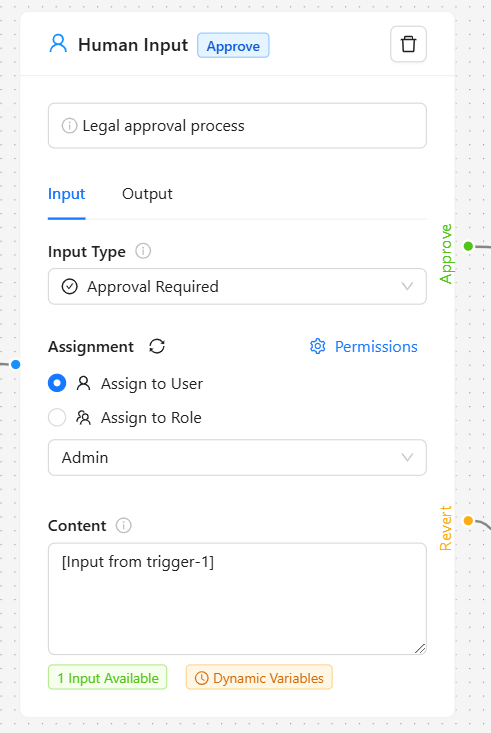
[[content] from trigger-1]so the current post body flows in. - Add a review step. Drag on a Human Input node, set its input type to Modification Required, and assign it to whoever edits your content, so nothing goes out without a person reading it first.
- File it as a draft. Drag on a Create Post/Product node, set Post type to post and Post status to draft, and map the approved text to the post content field, so the rewrite lands as an editable draft rather than touching the live page.
- Save, then run it once manually against a single post before you rely on the schedule, and watch the live execution panel to confirm each field maps the way you expect.
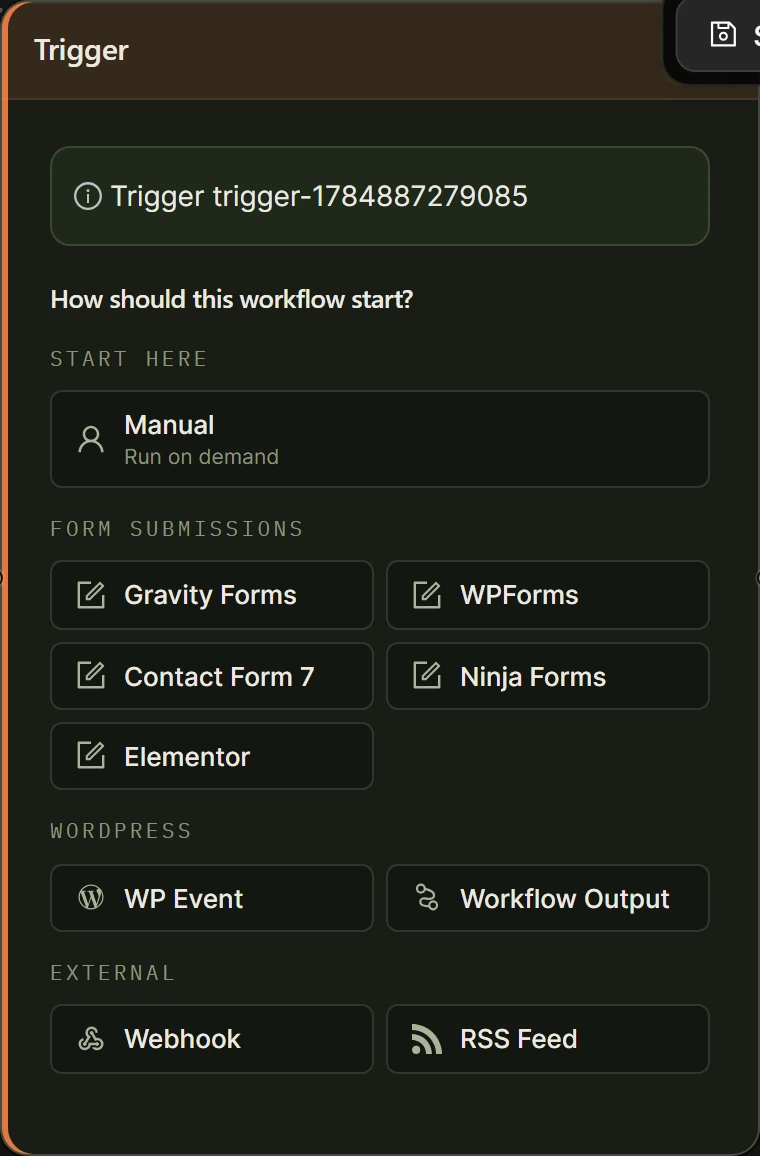
In Local mode this whole workflow runs on your own key at no cost in plugin credits. If you switch it to Cloud instead, the AI Model node is the only step that spends credits, at 2 credits per run; the trigger, the review step, and the draft post all cost 0. See Data Flow and Variable Handling for the full syntax behind those bracket tags.
For deeper, page-wide SEO work beyond this one rewrite pass, our general guide to AI SEO optimization in WordPress covers the broader workflow options.
Frequently asked questions
Does ChatGPT search use the same ranking signals as Google?
No, not the same formula. ChatGPT search runs a live web search through OpenAI’s own retrieval and cites a handful of the pages it reads, rather than returning ten ranked links. A page can hold a strong Google position and still never appear in a ChatGPT search answer, because the two systems weigh crawlability, passage clarity, and cross-source agreement differently rather than using one shared ranking signal.
How do I check whether AI crawlers can reach my WordPress site?
Start by visiting your own robots.txt file in a browser, usually at yoursite.com/robots.txt, and confirm it does not disallow OAI-SearchBot or PerplexityBot. Then check your security plugin and your host’s firewall for any rule that blocks unfamiliar or bot-like user agents, since that is a more common cause of blocking than robots.txt itself. Both OpenAI and Perplexity publish their crawlers’ user agent strings and IP ranges so you can confirm a request is genuine.
Should I block GPTBot if I do not want my content used to train AI models?
You can, and it will not remove you from ChatGPT search. OpenAI operates GPTBot, which collects training data, separately from OAI-SearchBot, which powers ChatGPT’s search feature. Disallowing GPTBot in robots.txt signals that your content should not be used to train future models while leaving OAI-SearchBot free to keep surfacing your pages in search results.
Does Perplexity train its models on my content the same way ChatGPT’s crawler does?
No. Perplexity’s own documentation states that PerplexityBot is used to index sites for search results and “is not used to crawl content for AI foundation models,” so allowing it is specifically about eligibility for citation in Perplexity’s answers, not about supplying training data.
The fastest way to find out whether any of this changes something is to run the workflow with a Manual trigger on five older posts and check both engines for those topics again in a week. Install the plugin free from the WordPress plugin directory, and if Google’s AI Overviews are the bigger opportunity on your site right now, our guide to getting a WordPress site cited in Google AI Overviews covers that side on its own.