To get a WordPress page cited in Google AI Overviews, write the direct answer to the query in the first sentence, keep every heading self-contained, and answer real follow-up questions in an FAQ block near the end. AI Workflow Automation, a free WordPress plugin, can draft that answer-first summary and FAQ block from an existing post and save it as a draft for you to review.
AI Overviews are the AI-generated summaries Google shows above normal results for many queries, built from short passages pulled out of several pages, each linked back to its source. Being quoted is not the same as ranking first: Google can cite a page from position six over one at position one, if the lower page answers more directly. That favors smaller sites, since winning a citation is closer to writing clearly than to winning a backlink race.
AI Workflow Automation is a free WordPress plugin with a visual drag-and-drop builder that runs AI workflows, agents, and chatbots inside your own site, using your own API keys, with no external subscription required. Later in this guide we use it to draft an answer-first post from existing content, though the writing habits below apply with any tool.
What are Google AI Overviews, and how does Google decide what to cite?
Google AI Overviews are AI-written summaries that appear above standard search results for a share of queries, assembled from passages pulled out of multiple pages, each linked back to its source. No special markup or file is needed to appear in them: ordinary pages that are indexable, crawlable, and genuinely useful to the query are eligible, the same bar regular search results already clear.
Google’s documentation describes the process as “query fan-out”: the system issues several related searches across subtopics of what you typed, then builds the overview from whichever pages answer each subtopic best. That is one reason a page can be cited without ranking first for the exact phrase you searched. As Google Search Central puts it, “there are no additional requirements to appear in AI Overviews or AI Mode, nor other special optimizations necessary.”
A large-scale look at real AI Overviews backs that up. A Semrush study published in July 2025, based on 200,000 US keywords checked in September 2024, found the overlap between an AI Overview’s links and the top 10 organic results averages only around 20 to 26 percent, and that over half of desktop AI Overviews did not link to the page ranked first. Chasing position one and earning a citation are related projects, not the same one.
How do you write WordPress content that gets quoted instead of paraphrased?
Content earns a citation when Google can lift a passage cleanly without editing it, which means writing the way you would if you knew a machine would quote you. Four habits do most of the work: answer first, one idea per passage, name the subject again in every heading, and keep sentences short enough to stand on their own.
| Written to rank | Written to be quoted | |
|---|---|---|
| Opening sentence | Sets up the topic | States the answer directly |
| Pronouns | “It” and “this” lean on earlier text | Names the subject again |
| Heading style | A keyword phrase | The question a reader typed |
| Paragraph shape | Builds across several sentences | One complete idea, then stop |
| Evidence | Buried mid-article | Attached to the claim it supports |
Add an FAQ near the end of long or evergreen posts, phrased as the questions people actually ask rather than questions invented to plug a keyword. Each answer should make sense on its own, without the reader scrolling through the rest of the article first, because that stand-alone paragraph is the fragment Google may lift.
How do you check whether Google is already citing your site in AI Overviews?
You check AI Overview citations where you already check search performance: Search Console. Google confirms that traffic and impressions from AI features, including AI Overviews and AI Mode, appear in the Performance report under the Web search type, alongside your ordinary queries, not in a separate dashboard.
There is no dedicated “cited in an AI Overview” filter, so treat a jump in impressions for a query where you do not rank near the top as a hint rather than proof. The more direct check is manual: search your target phrase yourself, signed out, and see whether Google names your page as a source.
How do you add answer-first summaries and FAQ blocks to existing posts?
You do not have to rewrite an old post by hand to give it an answer-first opening and an FAQ block. A short local workflow can draft both from the existing text and drop them into a new draft post for review. You need the plugin installed and an API key from your AI provider added under Settings, and the workflow runs in Local mode, using your own key, at no cost per run.
- Create the workflow. Open AI Workflow Automation in wp-admin, create a new workflow, and name it after the post you are updating.
- Add a Trigger node and choose Manual. Paste the full text of the existing post as the optional starting text.
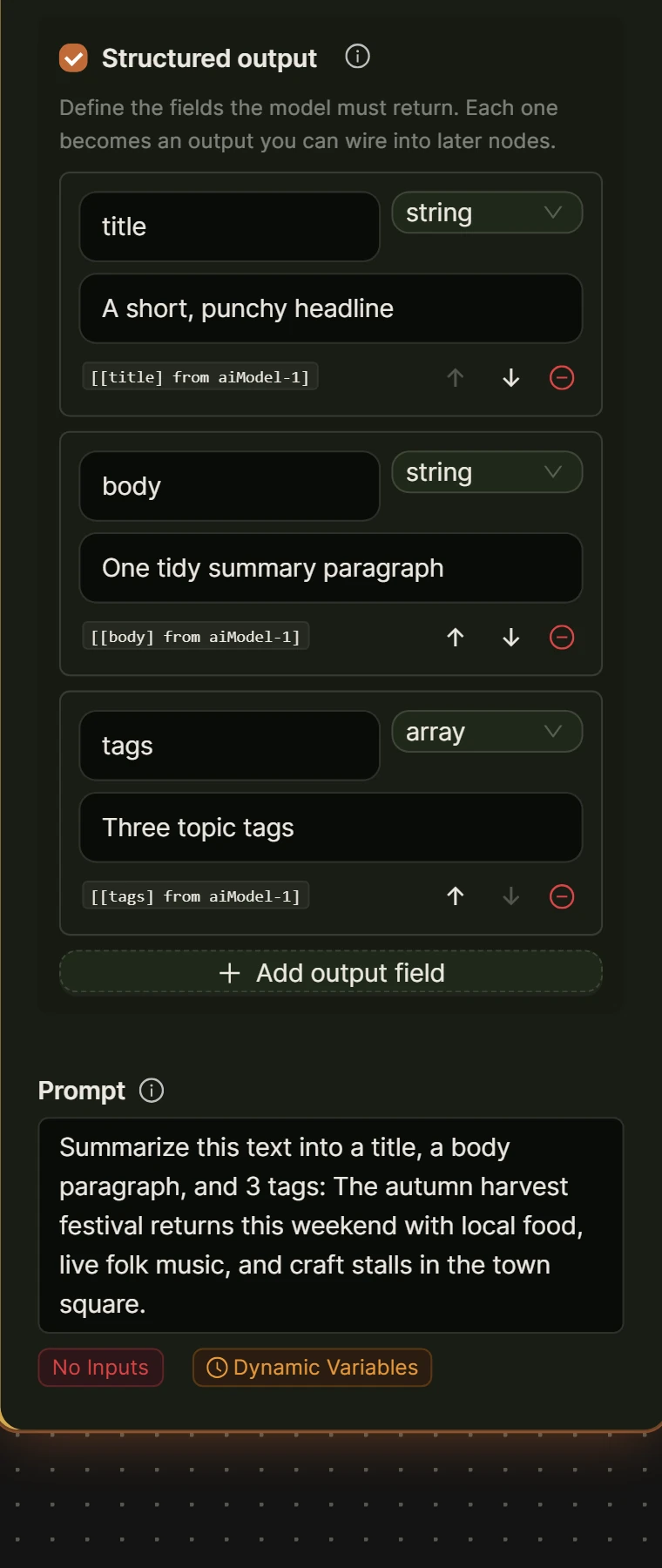
- Add an AI Model node (AI Prompt in the palette). On the Model tab, turn on Structured output and add two fields:
answer_summary, a 40 to 75 word passage that states the conclusion first, andfaq_block, three or four self-contained question-and-answer pairs from the article. Reference[Input from trigger-1]in the prompt. - Add an Optimize SEO node. Set Content to
[[answer_summary] from ai-1]and SEO keywords to the post’s target term, tightening the wording without losing the answer-first opening. - Optional: add a Human Input node, input type Modification Required, if you want a review step inside the workflow before anything reaches Drafts.
- Add a Create Post/Product node. Set Post type to post and Post status to draft. Map post_title to something like “AI Overview draft: [original title]” and post_content to
[Input from optimizeSEO-1]plus[[faq_block] from ai-1]. - Save and run. The draft lands in Posts, ready for an editor to paste the summary above the fold and the FAQ block near the end of the live article.
For a plain condensation without the answer-first framing, the Summary Generator node alone does that in one step. New to the builder? The step-by-step workflow guide covers the basics in about fifteen minutes.
What is Google’s Preferred Sources feature, and is it worth setting up?
Preferred Sources is a Google Search feature that lets a signed-in reader pick publications they trust, so Google can favor those choices with a preferred badge in Top Stories and with highlighting in AI Mode and AI Overviews. It rewards sites people already choose to follow, not sites that complete a technical checklist.
Setting it up is a domain-level decision, not a per-article one. Google’s documentation on preferred sources states that “only domain-level and subdomain-level sites are eligible to appear in the source preferences tool,” so a section inside a larger site cannot register separately. A self-hosted WordPress site on its own domain already meets that requirement; what is left is being the kind of source a reader would actually choose.
Does getting cited in AI Overviews replace normal search rankings?
No. A citation inside an AI Overview does not carry the same traffic value as a normal search click, so it belongs on top of ranking work, not in place of it. When an AI summary appears, people click through to a website noticeably less often, so citations help visibility and trust more than they help visit counts on their own.
In a July 2025 study of real search sessions, Pew Research Center reported that “users who encountered an AI summary clicked on a traditional search result link in 8% of all visits,” against roughly twice that rate, 15%, when no summary appeared. Treat a citation as a brand mention worth having, not a replacement for the click a ranking still earns you. For the wider set of tactics beyond citations, see our guide to AI SEO optimization in WordPress.
If your posts already answer questions directly, you may not need a tool for this at all. Read back through your best-performing pages, add a direct answer at the top and a short FAQ near the bottom by hand, and see whether that changes anything in Search Console. The workflow above earns its keep once you are doing this across dozens of posts, not one.
Frequently asked questions
How long does it take for a change to affect AI Overview citations?
There is no published timeline, because AI Overviews are generated per query at the moment someone searches, not pre-built from a queue. Google recrawls and reindexes updated pages on its usual schedule, so a change can influence citations as soon as the page is reindexed, which on an active site is often a matter of days rather than months. Check Search Console’s Performance report for the page instead of guessing.
Do I need structured data or schema markup to appear in AI Overviews?
No. Google’s own guidance states plainly that no special schema or markup is required to appear in AI Overviews or AI Mode. Structured data still helps Google understand a page’s facts and can support other rich results, so it is worth doing for other reasons, but skipping it will not by itself block a citation.
Can I stop my site from appearing in AI Overviews specifically?
There is no separate opt-out for AI Overviews. Google treats AI features as part of standard Search, so the same tools control both: robots.txt controls what Googlebot can crawl, and tags such as noindex, nosnippet, or max-snippet limit what Google can show from a page, in AI Overviews as much as in ordinary results. No setting keeps a page visible in normal results while hidden from AI features alone.
Does AI Workflow Automation guarantee my content will get cited?
No tool can guarantee a citation, because Google chooses citations query by query, based on which page answers best at that moment. AI Workflow Automation removes the manual work of rewriting old posts: it drafts an answer-first summary and FAQ block from an existing article and saves both as a draft, so an editor reviews and publishes rather than starting from a blank page. The judgment about what to publish stays with a person.
The fastest way to see this in practice is to try it on one post you already have live: paste its text into a new workflow, draft the summary and FAQ, and compare the result against what is on the page today. Install AI Workflow Automation free from the WordPress plugin directory, and the quick start guide walks through your first workflow in the builder.