To let Claude or ChatGPT run your WordPress workflows, turn on WordPress’s Abilities API together with the free MCP Adapter plugin, then switch on workflow exposure inside AI Workflow Automation, a free WordPress plugin. Once it is on, any workflow with a Manual or Webhook trigger becomes a tool an outside AI assistant can list and run over the Model Context Protocol, using your own site and your own AI provider key.
The useful direction here is not “AI writes a WordPress post.” It is an outside assistant triggering the exact workflow you already built, with the guardrails you already set. AI Workflow Automation is a free WordPress plugin with a visual drag-and-drop builder that runs AI workflows, agents, and chatbots inside your own site, using your own API keys, with no external subscription required. The Abilities API and MCP Adapter give Claude or ChatGPT a standard door to knock on instead of a one-off integration.
What does it mean to connect Claude or ChatGPT to WordPress over MCP?
Connecting Claude or ChatGPT to WordPress over MCP means your site publishes a list of specific, callable actions an AI assistant can discover and run, instead of the assistant guessing at your admin screens. The Model Context Protocol is, in its own words, “an open-source standard for connecting AI applications to external systems,” the way a database driver lets many programs talk to many databases without custom code for each pair.
WordPress 6.9 introduced the piece that makes this possible: the Abilities API. An ability is “a self-contained unit of functionality with defined inputs, outputs, permissions, and execution logic,” registered once by a plugin and discoverable by anything that knows how to ask, whether PHP code, a REST client, or an AI agent. The MCP Adapter plugin exposes that list as an actual MCP endpoint, so an MCP-speaking client connects the way it would connect to any other MCP server. Put those pieces on top of a plugin that already runs workflows, and the site becomes a WordPress MCP server for whatever you choose to expose.
How is this different from a generic WordPress MCP adapter or the Connect an App node?
This feature is the inbound direction: outside AI agents call into workflows already built in AI Workflow Automation. It is not the same as a bare WordPress MCP adapter exposing raw content or post-editing calls with no workflow logic behind them, and it is not the same node as Connect an App, which runs the opposite way.
The Connect an App node lets a workflow you built reach out to more than 2,700 third-party apps, such as Google Sheets or Slack, as an action step. That is outbound: your workflow calling other services. Exposing a workflow to Claude or ChatGPT over MCP is inbound: an outside assistant calling your workflow. You can use both in the same build.
If what you actually want is an agent that lives inside WordPress and decides which of your own tools to use, rather than an outside assistant calling in, our guide to building an AI agent in WordPress without code covers that build instead.
How do you turn on workflow exposure in AI Workflow Automation?
Before you start, have AI Workflow Automation installed and activated, an AI provider key already added under Settings, and WordPress 6.9 or later.
- Confirm your WordPress version. You need a build that ships the Abilities API: WordPress 6.9, or 7.0 and later. The plugin detects the Abilities API automatically. On an older WordPress the exposure toggle simply has no effect, so update first if you are behind.
- Install the MCP Adapter plugin. This free plugin turns your site’s abilities into a real MCP endpoint. Without it, abilities are still reachable through the core Abilities REST endpoint, but an MCP client has no server to connect to.
- Pick or build the workflow to expose. Set its trigger to Manual or Webhook. These are the only two trigger types that can be exposed, which rules out a workflow tied to a WordPress core event or a form plugin.
- Open Settings, then AI Agents (MCP). This is the panel dedicated to the feature.
- Switch on “Expose workflows to AI agents.” It is off by default, and turning it on never changes how your workflows run for normal, non-agent use.
- Copy the endpoint. The panel shows the MCP endpoint URL, visible once the MCP Adapter is active, and the Abilities REST endpoint for anyone working with the Abilities API directly.
- Add the endpoint to your assistant. In Claude, ChatGPT, or another MCP client, add a new connector pointed at that URL.
- Ask the assistant to list what it can do, then run one workflow. Check the result in the plugin’s normal execution history, the same place any other local run shows up.
Nothing about the workflow itself changes, because an agent-triggered run is treated as a normal local run once it starts.
Which workflows can Claude or ChatGPT actually run?
Claude or ChatGPT can only run active workflows using a Manual or Webhook trigger, up to 100 exposed workflows per site. Scheduled runs, RSS-triggered workflows, core event triggers, form-plugin triggers, and workflow-to-workflow chains stay off limits to outside agents no matter what you switch on.
| Trigger type | Can be exposed to an agent? | What the agent supplies |
|---|---|---|
| Manual | Yes | A single optional text input that overrides the stored trigger content for that run |
| Webhook | Yes | A payload whose fields match the keys defined on the webhook trigger |
| Scheduled | No | Not applicable, runs on its own schedule |
| WordPress core event | No | Not applicable, fires from site activity |
| RSS feed | No | Not applicable |
| Form plugin (Gravity Forms, WPForms, Contact Form 7, Ninja Forms, Elementor Forms) | No | Not applicable |
| Another workflow (chaining) | No | Not applicable |
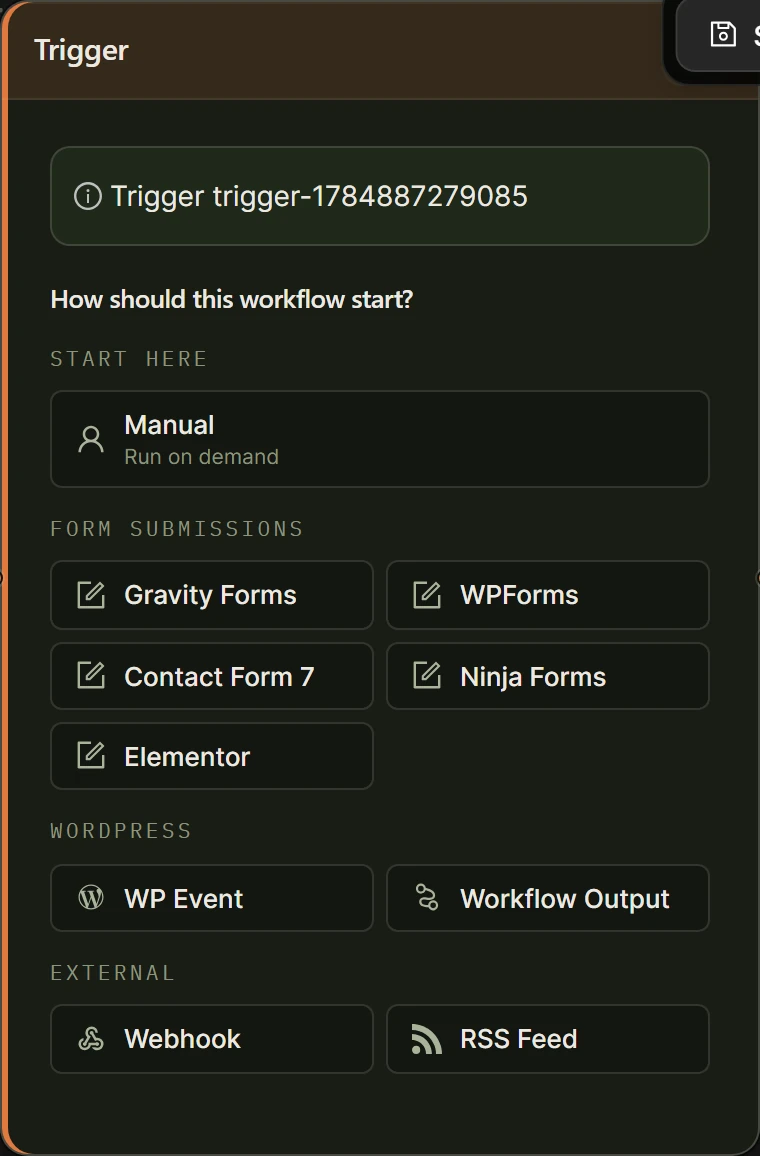
Each exposed workflow gets its own runnable ability, named wp-ai-workflows/run-<id>, alongside a separate read-only discovery ability, wp-ai-workflows/list-workflows, so an agent can see what is available before it runs anything. Run WordPress automations from Claude the way you would run them from the builder’s own Run button: the assistant supplies the input, your site does the work.
Execution stays local. An agent-triggered run uses your own AI provider key on your own server, in Local mode, and still respects whatever per-workflow spend controls you have set. A separate, optional cloud mode runs workflows on our hosted engine for credits, unrelated to whether a workflow is exposed to an agent.
How do you connect Claude, ChatGPT, or another MCP client to run a workflow?
You connect an assistant to your exposed workflows the same way you would connect it to any other MCP server: by adding the endpoint URL as a new connector in that assistant’s settings. The exact menu differs by client, but the shape of the step does not.
In Claude, this is the connector or MCP server settings in Claude Desktop or Claude.ai: add a new remote server and paste in the MCP endpoint URL. ChatGPT and other OpenAI-based tools work the same way. OpenAI’s own developer documentation puts it plainly, that “remote MCP servers can be used to connect models over the Internet to new data sources and capabilities.” Once added, ask the assistant what it can do, and it should list your exposed workflows by name.
Watch the first run rather than trusting it blind. Open the plugin’s execution history in another tab while you test, and confirm the run that appeared there really came from the agent and did what you expected.
Is it safe to expose WordPress workflows to outside AI agents?
Exposing a workflow is safe when you keep the exposed list small, leave the feature off unless you are actively using it, and add a human checkpoint before anything consequential runs. The plugin’s defaults point that way already: off until you turn it on, and only administrators can invoke an exposed workflow by default, though that capability is filterable for developers who need to change it.
Two habits matter more than any setting. Only expose workflows you would be comfortable running from a Manual trigger anyway, since that is effectively what an agent is doing. And put a Human Input node in front of any step with real consequences, such as publishing content or sending an email. An agent-triggered run behaves like any other local run, so a node set to Approval Required still pauses it for a person to approve on the Tasks page.
The Model Context Protocol’s own security guidance takes the same position for MCP servers generally, recommending teams “implement a progressive, least-privilege scope model” rather than granting broad access up front. Exposing two or three narrow, well-tested workflows and expanding deliberately is the practical version of that advice here. See our security and privacy overview for how keys and data are handled more broadly.
Frequently asked questions
What is MCP in WordPress?
MCP, the Model Context Protocol, is an open standard that lets AI applications like Claude or ChatGPT discover and call specific actions a system exposes, instead of needing a custom integration for every pair of tools. WordPress 6.9 added the Abilities API, a standard way for plugins to register callable functionality, and the separate MCP Adapter plugin turns that list of abilities into an actual MCP endpoint an assistant can connect to.
Can ChatGPT connect to WordPress the same way Claude does?
Yes. Both Claude and ChatGPT can act as MCP clients, so both connect to the same MCP endpoint your site publishes once you turn on workflow exposure in AI Workflow Automation. The setup step is the same either way: add the endpoint URL as a new connector in whichever assistant you use.
Do I need a paid plan to let Claude or ChatGPT run my workflows?
No. Exposing workflows to AI agents runs on your own WordPress site using your own AI provider key, the same as any other local run, and needs no platform account or paid plan. You do need the free MCP Adapter plugin if you want a proper MCP endpoint rather than the raw Abilities REST list.
Will turning this on change how my workflows run normally?
No. The toggle only controls whether eligible workflows are discoverable and callable by an outside AI agent. Every workflow keeps running exactly as before for its normal triggers, and switching the feature off again simply removes that outside access without touching the workflow itself.
Can an agent run a workflow triggered by a form submission or a schedule?
No. Only workflows with a Manual or Webhook trigger can be exposed, up to 100 per site. A workflow that runs on a schedule, an RSS feed, a WordPress core event, a form-plugin submission, or another workflow finishing cannot be called by an outside agent no matter how the exposure setting is configured.
The fastest way to see whether this fits your site is to build one small workflow, set its trigger to Manual, and expose just that one first. Install AI Workflow Automation free from the WordPress plugin directory, and read the full reference in the Abilities and MCP documentation before you connect anything real.