Manage many sites from one account
If you run AI Workflow Automation across several WordPress sites, you can manage them all from one owner-only console instead of logging into each site separately. Multi-site management is part of the Business plan, which covers up to 50 sites.
The free Local (BYOK) mode already works on any number of sites with no account. Multi-site management is about the shared cloud account: the sites that draw on your credits.
The Sites console
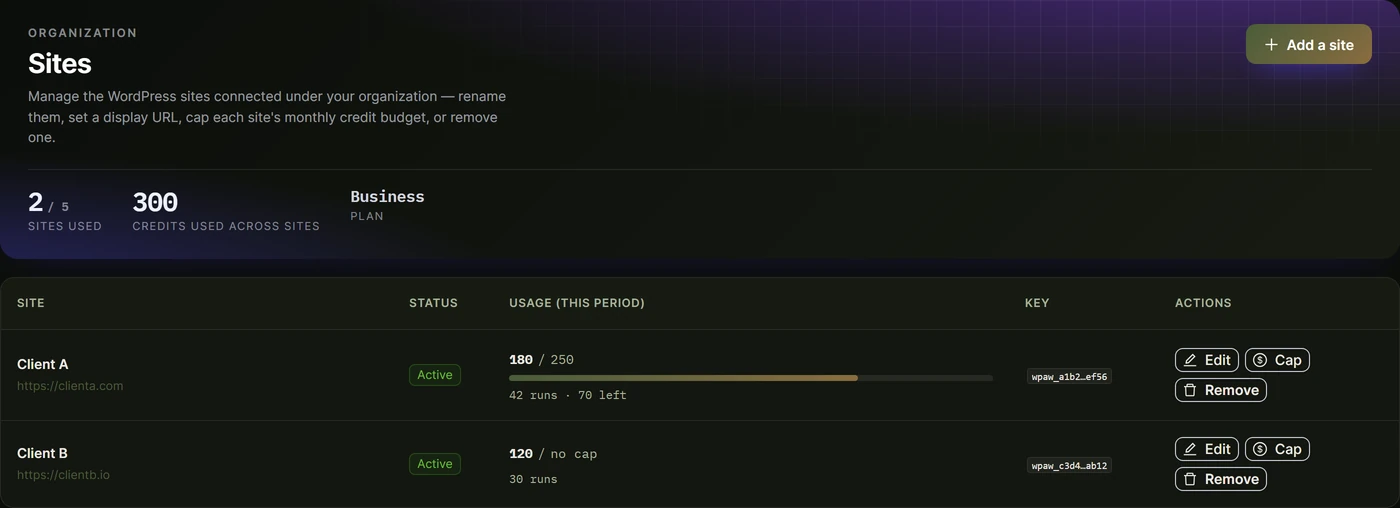
Open Organization / Sites from your account. It lists every site connected to your organization, and for each one you can see its usage and manage its settings in one place.
Adding a site
You connect a site in two ways:
- From the site itself. Install the plugin and connect the same account in that site’s Account panel. It joins your organization and appears in the console.
- From the console. Use Add a site to provision a site key ahead of time, give the site a name and URL, then connect it.
Each site gets its own site key, so usage and cloud callbacks are always attributed to the right site.
Per-site controls
For any site in the console you can:
- Rename it and set its URL, so a long client list stays readable.
- Set a per-site credit cap, a monthly ceiling on how many shared credits that site may spend. This stops one busy client from draining the whole balance. Clear the cap to remove the limit.
- See per-site usage, so you can bill clients or spot a site that is consuming more than expected.
- Remove the site when a client relationship ends.
Shared credits
All connected sites draw from your organization’s single credit balance. Your monthly plan allowance and any top-ups are pooled, and per-site caps let you divide that pool fairly. Watch overall consumption in the Usage Center, and add credits from Plans, top-ups, and billing.
Whitelabel
Agencies can present the plugin under their own brand to clients, so the builder your clients see carries your identity rather than ours.