To make a WooCommerce store visible to ChatGPT shopping and similar AI agents, give every product complete, specific data: an accurate price and stock status, a real brand and seller name, a working canonical URL, and a description that says what the item actually is, not templated filler. AI shopping agents read structured product data, not page layout, so thin listings are effectively invisible to them, regardless of how they rank in classic search.
We build AI Workflow Automation, so we spend time thinking about what an AI system actually reads versus what a human sees on screen, and product pages are where the gap shows up hardest. AI Workflow Automation is a free WordPress plugin with a visual drag-and-drop builder that runs AI workflows, agents, and chatbots inside your own site, using your own API keys, with no external subscription required. This article covers what AI agents can actually see in a WooCommerce catalog, and what to fix first.
Nobody, including us, can promise a specific placement inside ChatGPT or any other AI shopping surface. What you can control is whether the facts on a product page are complete, accurate, and easy for a machine to extract, which also happens to make the page more useful to a human shopper.
What does it mean for a WooCommerce store to be visible to ChatGPT shopping?
Being visible to ChatGPT shopping means an AI agent can find a specific WooCommerce product, pull its price, availability, and defining details from structured data, and either answer accurately or hand the shopper a working link to buy it. A page an AI agent cannot parse might as well not exist to it, regardless of how it looks to a person or ranks in classic search.
OpenAI’s commerce documentation describes building “commerce flows for ChatGPT, including agentic checkout, delegated payment, and product feeds,” which tells you the mechanism is a data feed and a payment handshake, not a hidden ranking formula. Most stores are not signed up to that feed today, and the same data that would qualify one also helps any agent that simply reads the live page.
How do AI shopping agents actually read a product page?
AI shopping agents read a WooCommerce product in one of two ways: through a merchant feed built specifically for that purpose, or by fetching the live page and extracting facts from visible text and structured data rather than from images or page design. Either path fails on the same kind of input: a vague description, a missing price format, or a stock status the agent cannot map to a known value.
OpenAI’s product feed specification lists nine required fields per item: a unique identifier, title, description, canonical URL, brand, seller name, image URL, availability, and price, with availability restricted to a fixed set of values and price required as a decimal amount plus a currency code. A store does not need to submit that exact feed to benefit from the list, which doubles as a plain checklist for what any AI agent needs to read a page correctly.
| Field | What the feed spec requires | What WooCommerce gives by default |
|---|---|---|
| Unique identifier | One id per product or variant | Yes, product ID or SKU |
| Title | Product name | Yes, usually fine |
| Description | A specific description | Often thin or copied across variants |
| URL | An absolute, working link | Yes, the permalink |
| Brand | The product’s brand | Often blank, no default attribute |
| Seller name | Name of the selling business | Not a native field, set once |
| Image URL | A direct product image link | Yes, the featured image |
| Availability | One of a fixed set of values | Stock status maps, wording differs |
| Price | Decimal amount plus currency code | Yes, format needs converting |
What is the Agentic Commerce Protocol, and is WooCommerce part of it yet?
The Agentic Commerce Protocol, or ACP, is an open standard built by Stripe and OpenAI that lets an AI agent complete a purchase on a merchant’s behalf without the AI platform becoming the seller of record. It is the plumbing behind features like in-chat checkout, working through a product feed and a payment handshake between the agent, the merchant, and a payment processor.
The Agentic Commerce Protocol describes itself as “an open standard for programmatic commerce flows between buyers, AI agents, and businesses,” released under an open source license. Support for ACP arrives through payment processors and platform integrations rather than a setting you switch on in a store, so check what your payment provider and WooCommerce currently offer before planning around it. The groundwork it needs, accurate product data, is the same groundwork that helps today either way.
Which WooCommerce product fields matter most for AI visibility right now?
The WooCommerce fields that matter most for AI visibility are the ones a human would also want answered before buying: a specific description, a real brand, an accurate price and stock status, a stable canonical URL, and images with descriptive alt text. None of this needs new software, only a pass through a catalog filled in quickly when the store first launched.
- Description. Name the material, size, and use case, not a reworded category name.
- Brand and attributes. Fill the brand field even for a single-brand store; empty reads as unknown, not implied.
- Price and stock status. Keep both current, since a wrong stock status makes an agent confidently tell a shopper something false.
- Canonical URL. One product, one URL. Duplicate pages from filters or session parameters confuse anything identifying the page for an item.
- Images and alt text. A descriptive alt attribute gives an agent that cannot see the image something to read.
- Structured data. Schema.org Product markup states these facts in a machine-readable format. Google’s documentation notes that adding it means “your product information can appear in richer ways in Google Search results.”
We have written separately about generating WooCommerce product descriptions in bulk with AI; this piece assumes descriptions already exist and asks whether an AI agent can trust and parse them. For the rest of what we cover for stores, see our e-commerce page.
How do you fix thin product descriptions across a big catalog without doing it one by one?
Fixing thin descriptions across a few hundred WooCommerce products by hand is a job that gets postponed indefinitely, which is exactly the kind of job to automate with a review step at the end rather than skip. The workflow below drafts new copy and FAQ content per product and leaves every change staged for a person to check before anything on the live page changes.
You need the plugin installed, an AI provider key from OpenAI or OpenRouter added under Settings, and a WooCommerce catalog with products in it. This runs in Local mode with your own key, so the catalog goes nowhere except to your chosen AI provider.
- Create a new workflow and name it, for example “Product copy drafts.”
- Add a Trigger node and choose Manual.
- Add an API Call node. Set URL to your WooCommerce products endpoint (it returns 10 products per request unless you add a per_page parameter, up to 100), Method to GET, and Auth to basic, using the consumer key and secret from WooCommerce, Settings, Advanced, REST API.
- Add a Loop / While node. Set Loop type to For each and Content to [[data] from apiCall-1], the product list returned.
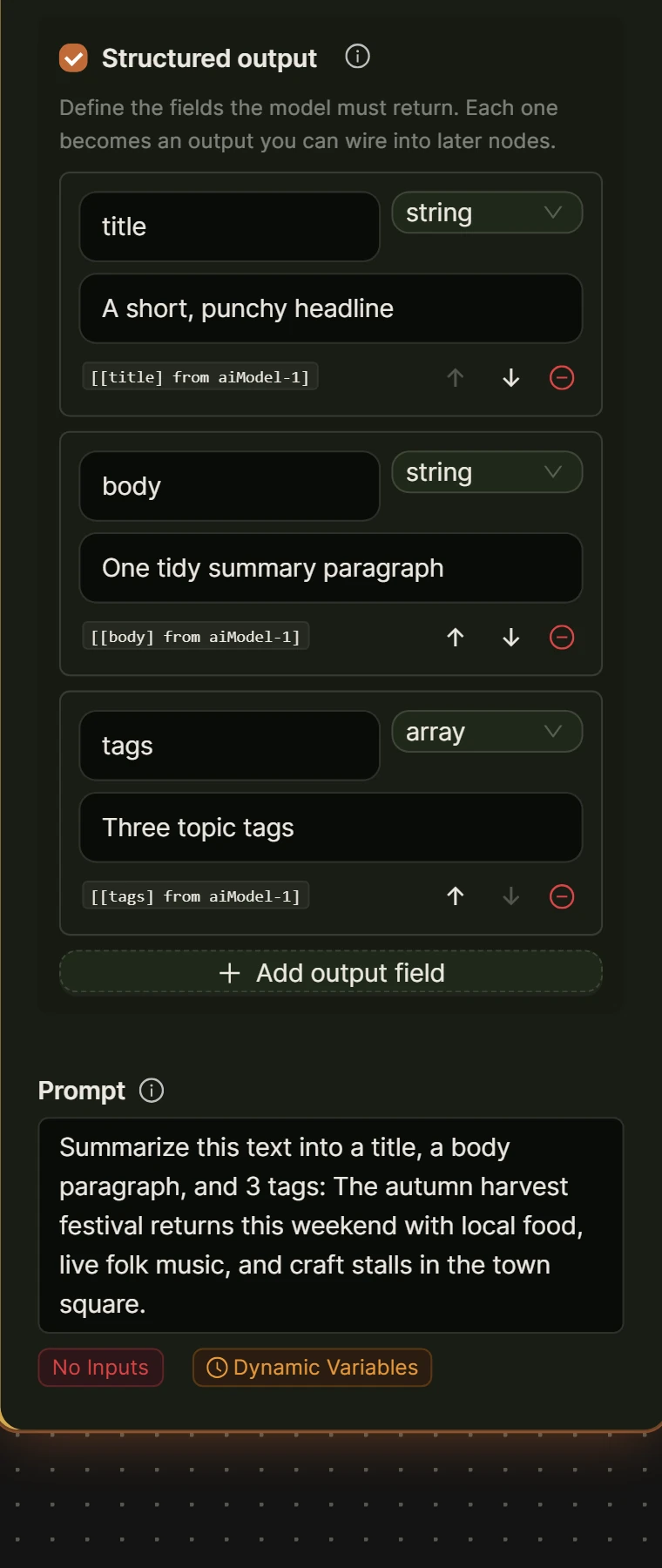
- From the loop’s body handle, add an AI Model node. Turn on Structured output with fields for description, short_description, and faq (a list). Reference the current product with [[currentItem] from loop-1], and instruct the model to use only facts already in the product data.
- Add a Create Post/Product node after it. Set Post type to product, and use Field mappings to write the outputs into custom fields such as draft_description and draft_faq, not the live description, so drafts sit on the product without changing what shoppers see.
- From the loop’s after handle, add an Output node set to Display, so the run finishes with a list you can scan.
- Save, then Run, and watch the live execution panel process each product.
- Open each product in WooCommerce, Products afterward, and copy over whatever draft you like. Nothing publishes until you decide it should.
How do you write product FAQs that AI agents and shoppers both use?
Product FAQs that work for AI agents and shoppers are the same thing: a real question, followed by a direct, specific answer covering what a description tends to skip, sizing, materials, care, shipping, and returns. A question and answer pair is also the shape a language model handles best, mapping cleanly onto one fact instead of forcing an agent to infer it from marketing copy.
Write FAQs from your support inbox rather than guessing, since the questions that reach support are the ones your product page failed to answer. If a workflow drafted FAQ entries, read every one before publishing: a fabricated shipping promise is worse than no FAQ. For more on writing content AI systems can cite, see our piece on getting a WordPress site cited in AI Overviews.
Frequently asked questions
Does my WooCommerce store need a special plugin to appear in ChatGPT shopping?
No single plugin can guarantee placement in ChatGPT shopping results, because visibility depends on data quality and, for actual in-chat checkout, on your payment processor’s support for the Agentic Commerce Protocol. What you control today is the groundwork: complete product data, working Product schema, and specific descriptions, so that whichever surface an AI agent uses to read your store, a submitted feed or a live page, it finds something accurate to work with.
What is Product schema markup, and do I need it if I already use an SEO plugin?
Product schema is structured data, defined at schema.org and documented by Google, that states a product’s price, availability, and identifying details in a machine-readable format instead of leaving them to be guessed from page text. Most WooCommerce SEO plugins already output this automatically, so check your page source for a script tag of type application/ld+json before adding a second, conflicting copy.
Can AI Workflow Automation submit my products to ChatGPT or add a checkout button?
No. AI Workflow Automation does not integrate with ChatGPT’s product feed or checkout, and no plugin can hand a store a spot inside someone else’s shopping surface. What it can do is help generate and update the product data, descriptions, and FAQ content that any AI agent, ChatGPT included, needs to read a store accurately, using your own AI provider key inside your own WordPress site.
How is being visible to AI shopping agents different from ranking well in Google Shopping?
Google Shopping ranks products against each other inside a search results page using signals built over many years, including a Merchant Center feed and structured data on the page. AI shopping agent visibility is younger and less standardized: today it mostly comes down to whether an agent, browsing the open web or reading a submitted feed, can extract accurate facts at all, before any question of ranking one product above another even applies.
Fixing a WooCommerce catalog for AI agents is mostly a data problem, not a new plugin problem, since most of what ChatGPT shopping and similar agents need, a store already half has. Install AI Workflow Automation free from the WordPress plugin directory and connect your own AI provider key to start clearing the backlog of thin descriptions and missing FAQs. For the chat side of AI shopping on your own site, our guide to a WooCommerce AI shopping assistant covers that build.